
Summary
Editor's rating
Value for money: where it stands versus fancier smart thermostats
Design: looks a bit old-school, but it’s practical
Power and wiring: the C‑wire situation you shouldn’t ignore
Build quality and reliability: does it feel like it’ll last?
Performance and everyday use: does it actually keep the house comfortable?
What this thermostat actually offers in real life
Pros
- Straightforward app control and scheduling that work reliably once set up
- Clear color touchscreen with customizable background and easy-to-read info
- Good compatibility with most standard 24V systems and voice assistants (Alexa, Google)
Cons
- C‑wire required, which can mean extra cost or hassle for older systems
- No remote sensors or occupancy detection, so it only measures temperature at the thermostat
- Wi‑Fi setup can be picky about router settings (2.4 GHz, WPA2 Personal, etc.)

Specifications
View full product page →| Brand | Honeywell Home |
A smart thermostat for people who just want it to work
I’ve been using the Honeywell Home RTH9600WF Smart Color Thermostat for a little while now, replacing an older basic programmable model. I didn’t buy it to "upgrade my smart home" or anything dramatic; I just wanted to stop walking to the hallway every time I was too hot or too cold, and maybe cut the energy bill a bit. So this is coming from a regular homeowner, not someone who collects gadgets for fun.
The first thing to know is that this thermostat is pretty straightforward. It’s not as fancy as a Nest or Ecobee with room sensors and motion detection, but it covers the main stuff: Wi‑Fi control, a clear touchscreen, scheduling, and integration with Alexa/Google. In daily use, that’s what actually matters. I open the app, change the temp, done. No drama.
Where it gets a bit tricky is installation and Wi‑Fi setup. Honeywell screams "C‑wire required" everywhere, and they’re not kidding. If your system doesn’t have a C‑wire, you’re either buying an adapter or calling someone who knows what they’re doing. Also, the Wi‑Fi is a bit picky about router settings, which is annoying if you’re not techy. Once it’s connected though, it stays connected pretty well.
Overall, my feeling so far: it’s a practical, middle-of-the-road smart thermostat. Not flashy, not the cheapest, but it does the job and the interface is easy enough for anyone in the house to use. It’s not perfect, and there are a couple of points where Honeywell clearly cut corners, but if you want something familiar that adds app control and basic smart features, this one fits that profile.
Value for money: where it stands versus fancier smart thermostats
In terms of price, the Honeywell RTH9600WF usually sits in the mid-range. It’s cheaper than top-end Nest or Ecobee models, but more expensive than a basic programmable thermostat with no Wi‑Fi. For what you pay, you get a good mix of features: app control, voice assistant support, a color screen, scheduling, and ENERGY STAR certification. It’s not the cheapest way to get remote control, but it’s also not overkill if you just want the main smart features without going deep into automation.
Where it makes sense is for someone who wants a familiar brand and a layout that looks like a "normal" thermostat. Compared to something like a Nest, this feels more traditional: you have clear buttons on screen, simple menus, and not a lot of hidden logic guessing what you want. You lose out on room sensors and occupancy detection, but you also avoid some of the "it keeps changing the temp by itself" complaints that learning thermostats sometimes get.
There are a couple of value points to keep in mind. First, the C‑wire requirement can add cost if you need an adapter or professional installation. That can quickly bump the total price closer to higher-end competitors. Second, some utility companies offer rebates for ENERGY STAR smart thermostats, and this model often qualifies. If you grab a rebate, the value looks a lot better and can put it into budget territory.
Overall, I’d say the value is pretty solid if: 1) you already have a C‑wire, 2) you just want reliable app control and scheduling, and 3) you don’t care about advanced automation or remote sensors. If you’re starting from scratch with no C‑wire and you want something super modern-looking with more bells and whistles, it might be worth comparing prices with Nest or Ecobee before deciding. But for a straightforward smart thermostat that focuses on the basics, the cost-to-feature ratio is reasonable.
Design: looks a bit old-school, but it’s practical
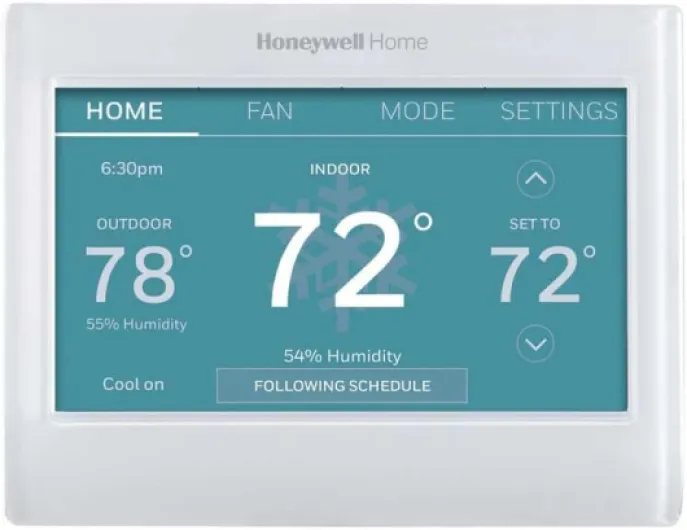
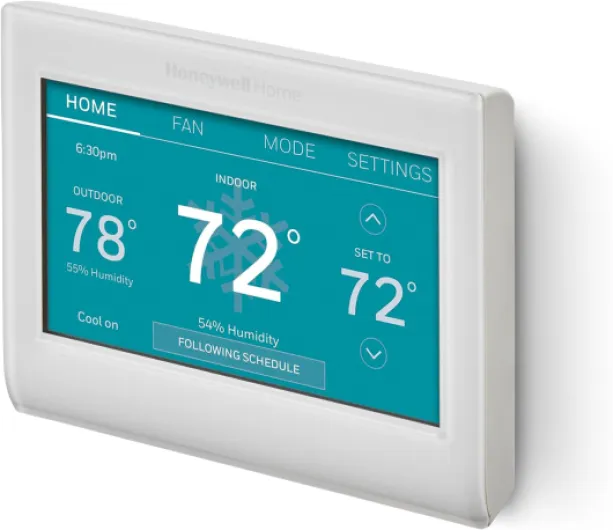
Design-wise, this thermostat sits in a weird middle spot. It’s not ugly, but it’s not exactly modern-looking either. The unit is a white plastic rectangle with a color LCD in the middle. If you’re used to sleek glass-front devices, this will feel a bit like "older smart home" style, but honestly, once it’s on the wall, you stop caring. The wall plate covers the marks from most old thermostats, which is nice if you don’t feel like repainting.
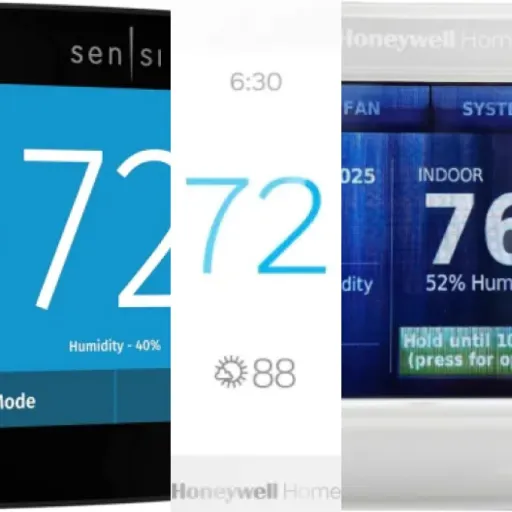
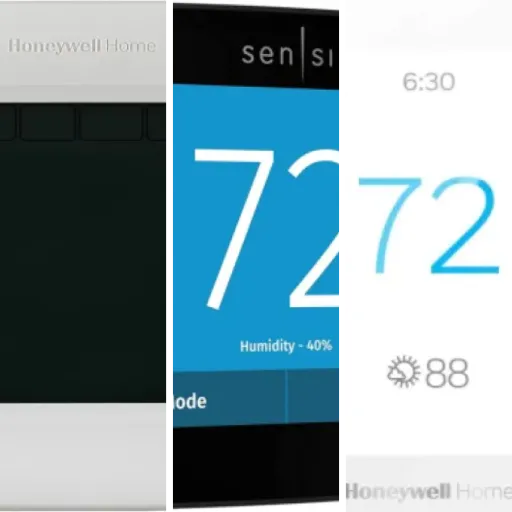
The color screen is actually one of the better parts. You can change the background color to match your wall or just pick something you like. I went with a darker tone so it doesn’t glow like a billboard at night. The brightness is adjustable, and the text is large enough that you don’t have to squint from across the hallway. Compared to the old non-color Honeywell I had, this is a lot easier to read, especially for older eyes.
The interface is pretty simple: big temperature number, current mode, and a few touch areas for settings and scheduling. It’s not the most responsive touchscreen out there; taps sometimes need a slightly firmer press than you’d expect from a modern phone. But once you get used to it, it’s fine. It’s definitely better than tiny physical buttons that you have to mash to change from 70 to 75 degrees.
In terms of size, it’s compact enough (about 4.75" wide and 3.5" high, roughly an inch deep). It doesn’t stick out awkwardly. The plastic feels like basic thermostat plastic: not premium, not super cheap. If you’re looking for a thermostat that disappears visually and just looks "normal," this one does that. If you want something that doubles as wall art, this isn’t it, but that wasn’t my goal anyway.
Power and wiring: the C‑wire situation you shouldn’t ignore
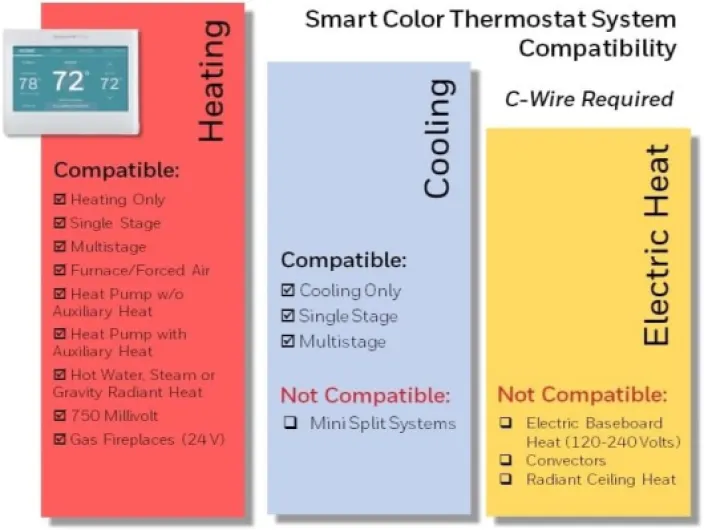
This thermostat is technically listed as "battery powered" in some specs, but in real life it’s a C‑wire powered thermostat. There’s no user-replaceable battery you’re meant to deal with. It pulls power from your HVAC system’s 24V line via the common wire. That’s why Honeywell keeps repeating "C‑wire required" everywhere. If you don’t have a C‑wire at your existing thermostat, this is where things can get annoying.
In my case, I already had a previous Wi‑Fi Honeywell model, so the C‑wire was there and swapping units was easy. If you’re coming from a very old, simple thermostat with just two or four wires, you’ll likely need either a C‑wire adapter kit or to run a new wire from your furnace/air handler. For a handy person, that’s doable; for someone who hates electrical stuff, this might mean calling an HVAC tech and paying extra. That’s a hidden cost people don’t always factor in when they see the thermostat price.
The upside of being powered off the C‑wire is that you don’t have to worry about replacing batteries or the screen dying every couple of years. It stays lit, keeps Wi‑Fi on, and handles all the smart features without chewing through AA batteries like some older models did. Once it’s wired correctly, it’s basically set-and-forget from a power standpoint.
One thing the manual and reviews hint at: this thermostat can be picky with some non-standard systems, like certain oil furnaces or setups without a proper common line. If you have a more complex or older system (like heating-only oil with no C‑wire), check compatibility carefully or talk to someone who knows HVAC. That Italian review complaining it doesn’t work in Italy is also a reminder: this is designed mainly for North American 24V systems and infrastructure. As long as you’re in that world and you have (or can get) a C‑wire, the power side is stable and you don’t have to think about it again.
Build quality and reliability: does it feel like it’ll last?
Durability with a thermostat is mostly about two things: does it keep working without freezing or bugging out, and does the hardware hold up to daily poking and temperature changes. So far, the Honeywell RTH9600WF feels pretty solid for what it is: a plastic box that lives on the wall and gets tapped a few times a day.
The plastic casing doesn’t feel premium, but it also doesn’t feel flimsy. The wall plate mounts firmly, and the thermostat clips onto it with a clear click. Once it’s on the wall, it doesn’t wobble or flex when you press the screen. The push-in wire terminals on the back are actually nicer than the old screw terminals; they hold the wires securely and make for a cleaner install. That also means fewer chances of a loose wire causing random dropouts later.
On the software side, I haven’t had crashes or random reboots. It boots up quickly after a power outage, reconnects to Wi‑Fi by itself, and remembers all the settings and schedules. The user reviews on Amazon (4.3/5 with a lot of ratings) suggest that most people have a similar experience: once it’s installed and configured, it quietly does its job. There are some complaints about app connectivity and region compatibility, especially outside North America, but that’s more about networking and services than the physical device falling apart.
Honeywell gives a 2‑year limited warranty, which is okay but not crazy generous. Given the brand’s track record with thermostats, I’m not too worried. These things usually stay on the wall for many years. I’ve had older Honeywell models run for a decade without issues. I’d expect this one to do the same unless your power is really unstable or your HVAC system is doing something weird. In short: build quality is decent, nothing fancy, but it feels like it’ll last and I don’t baby it.
Performance and everyday use: does it actually keep the house comfortable?
On the performance side, this thermostat does what it’s supposed to: it keeps the house at the temperature I set, without much drama. The temperature control is pretty accurate. I didn’t stick a lab-grade thermometer next to it, but compared to a couple of cheap digital thermometers I have, it’s usually within 1 degree. It doesn’t swing wildly or constantly overshoot like my old basic thermostat sometimes did.
The Smart Response feature is decent. If I set the schedule to 70°F at 7:00 AM, the system starts early enough so it’s already close to that by the time I wake up, not 40 minutes later. It’s not perfect down to the minute, but it’s good enough that mornings are more comfortable. The auto heat/cool mode is also handy in shoulder seasons; I don’t have to manually swap between heat and AC when the weather can’t make up its mind.
Wi‑Fi performance is mostly solid. Once I got past the initial setup hiccup (it strongly prefers a 2.4 GHz network and a more basic security mode like WPA2 Personal), it has stayed connected. The app updates within a few seconds when I change something, and I haven’t had random disconnects. A couple of Amazon reviewers mentioned needing to tweak their router settings (like disabling mixed WPA/WPA2 mode), and I had a similar experience, so that’s something to be aware of if your router is set to auto everything.
One limitation that matters: there’s no occupancy detection and no remote sensors. So the thermostat only knows the temperature where it’s mounted. If your hallway is cool but your upstairs bedroom bakes, this thermostat won’t fix that. For a single-zone, reasonably balanced home, it’s fine. If you’re trying to solve uneven heating/cooling, you probably need a different solution (sensors, zoning, or just fixing the ducting). Overall, as a straight-up temperature controller with smart access, performance is solid and predictable.
What this thermostat actually offers in real life
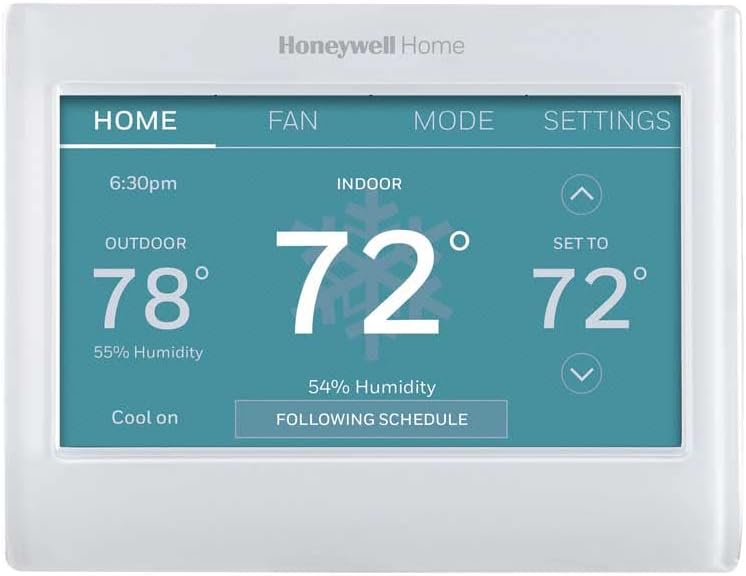
On paper, the Honeywell RTH9600WF checks a lot of boxes: Wi‑Fi thermostat, color touchscreen, ENERGY STAR certified, works with Alexa/Google Assistant, programmable schedules, smart alerts, and all that. In practice, what this means is: you can control your heating and cooling from your phone, you can see indoor/outdoor temperature and humidity on the screen, and you can set up weekly schedules so you’re not blasting heat or AC when nobody’s home.
The core features I actually use are pretty simple: manual temp changes from my phone, quick schedule adjustments when my routine changes, and checking the house temp when I’m away for a weekend. The app (Honeywell / Resideo) is not fancy, but it’s clear enough. I can see current temp, target temp, mode (heat/cool/auto), and the fan settings. It responds within a few seconds, which is fine. Voice control with Alexa also works, but that’s more of a novelty for me than something I rely on daily.
There are extra functions like smart alerts (filter change reminders, temperature alerts, etc.) and energy reports. The alerts are useful; the energy reports are basic. Don’t expect super detailed graphs like some higher-end thermostats. It shows trends and gives you a rough idea if you’re using more or less than before, but it’s not going to teach you energy science. Still, for a mid‑range thermostat, that’s acceptable.
One thing to be clear on: this model does not use remote room sensors, and it doesn’t "learn" your schedule like some other brands claim. It does have Honeywell’s Smart Response, which basically pre-heats or pre-cools so it reaches the target temp at the time you set, but it’s not some magic AI system. If you want advanced automation and room-by-room control, this isn’t it. If you just want reliable temperature control with app access, this is more than enough.
Pros
- Straightforward app control and scheduling that work reliably once set up
- Clear color touchscreen with customizable background and easy-to-read info
- Good compatibility with most standard 24V systems and voice assistants (Alexa, Google)
Cons
- C‑wire required, which can mean extra cost or hassle for older systems
- No remote sensors or occupancy detection, so it only measures temperature at the thermostat
- Wi‑Fi setup can be picky about router settings (2.4 GHz, WPA2 Personal, etc.)
Conclusion
Editor's rating
The Honeywell Home RTH9600WF is a no-nonsense smart thermostat that does the core job well: it keeps your home at the temperature you want and lets you control it from your phone or with Alexa/Google. The color touchscreen is easy to read, the UI is simple enough for non-techy people, and once it’s installed, it just quietly does its job. It’s not packed with high-end tricks, but for everyday use, it covers the essentials: scheduling, app control, basic energy info, and smart alerts.
It’s not perfect, though. The C‑wire requirement is a real barrier if your system is older, and getting around that can cost extra. The touchscreen feels a bit dated compared to newer devices, and you don’t get things like remote sensors or occupancy detection. If you want deep automation and room-by-room fine-tuning, this isn’t the right model. But if you’re in a typical single-zone home with a compatible 24V system and you just want something reliable that feels familiar, it’s a solid middle-ground choice.
Who it’s for: homeowners who already have (or can easily add) a C‑wire, want remote control and simple scheduling, and prefer a classic thermostat layout over a fancy design. Who should skip it: people with incompatible systems (like some European setups or electric baseboard), anyone without a C‑wire who doesn’t want to mess with wiring, and those who really care about advanced smart features like room sensors and heavy automation. For the average user who just wants to upgrade from a dumb thermostat without overcomplicating their life, this model gets the job done.