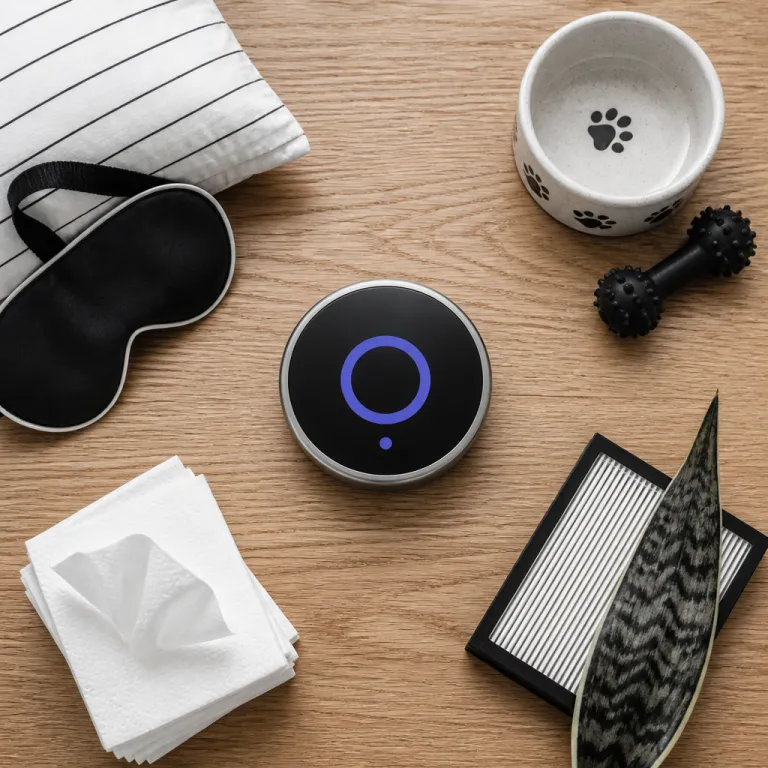
Why smart thermostat comfort modes profiles matter for real homes
A basic thermostat only thinks about one thing at a time. Modern smart thermostat comfort modes profiles think about temperature, energy and comfort together, then adjust heating and cooling automatically. When you use these profiles well, you get complete control without constantly setting temperature manually.
Smart thermostats from Ecobee, Nest and Honeywell now treat each day as a pattern, not a blank slate. They build profiles around how you actually live, using time, room occupancy and even air quality to shape temperature settings that feel natural. Instead of one rigid schedule, you get layered settings for sleep, work, night, weekend and away modes that help ensure energy efficient operation without sacrificing comfort.
This shift turns the thermostat from a wall gadget into a home comfort system. A smart thermostat can coordinate heating cooling, fan runtime and even dehumidification as one integrated control layer. Over time, these thermostats learn recovery behavior, starting heating or cooling early so the room reaches the right temperature at the right time, which is where smart thermostat comfort modes profiles quietly earn their keep.
Sleep comfort modes that match how people actually rest
Sleep mode is where smart thermostat comfort modes profiles usually pay for themselves. Most people sleep better when the room temperature drops slightly at night, then rises again before the alarm, and a smart thermostat can automate that curve with precise temperature settings. Instead of one flat night setting, you can program a gradual change that respects both comfort and energy.
On Ecobee Premium and Nest Learning Thermostat, you can create sleep profiles that start cooling the room about an hour before bedtime. The system then uses recovery logic to reach your preferred setting temperature exactly when you lie down, rather than blasting heating or cooling at the last minute. If your schedule shifts, you can tweak the setting in the app in seconds, which is far easier than reprogramming older thermostats.
For households with different sleep patterns, room sensors become essential tools. A smart thermostat that reads a sensor in the bedroom can prioritize that room at night, instead of averaging the whole house temperature. Used well, these sleep profiles help ensure you wake up comfortable without running the heating system hard all night, which is the kind of quiet energy efficient win you actually feel on the gas bill.
For more detail on building realistic schedules around when your home is actually occupied, see this guide on programming a thermostat around real-life empty-house times, which pairs neatly with advanced sleep and night comfort modes.
Pet mode, freeze protection and work from home stability
Occupancy based away modes are great for energy, but they can be rough on pets. Smart thermostat comfort modes profiles that include a dedicated pet mode keep temperature within a safe band even when motion sensors think the house is empty. That way, your dog is not shivering because the thermostat decided to chase one more kilowatt hour of savings.
Some thermostats let you set a minimum heating temperature and maximum cooling temperature as a safety net. These guardrail settings act as freeze protection in winter and overheat protection in summer, especially useful for second homes or rooms with sensitive decor or electronics. When combined with app alerts, you get complete control at a distance and can intervene before a minor issue becomes a burst pipe or a ruined room.
Work from home changed how people use their thermostats during the day. Instead of a simple away block, many households now need a stable office temperature while keeping the rest of the home in an energy efficient state, which is where zone aware profiles and room sensors shine. Some utilities are starting to pair these profiles with time of use pricing, and this analysis of thermostats that react when electricity costs spike shows how smarter schedules can protect both comfort and your bill.
Allergy, air quality and the humidity dimension of comfort
Temperature is only half the comfort story, and smart thermostat comfort modes profiles are finally catching up. Ecobee Premium, for example, includes an air quality sensor that can trigger extra fan runtime when pollen or smoke levels rise, using the existing heating cooling system to filter air more aggressively. That allergy mode does not change the thermostat setting temperature much, but it changes how often the system circulates air through your filters.
Humidity is the other hidden lever. At 24 degrees Celsius with 60 percent humidity, a room feels warmer and heavier than the same temperature at 40 percent, which is why some smart thermostats now coordinate with dehumidifiers or variable speed air conditioners. When these thermostats see high indoor humidity, they can extend cooling cycles slightly or run the fan differently, trading a small amount of extra energy for a big jump in perceived comfort.
Allergy and air quality profiles work best when you pair them with good filters and realistic expectations. A thermostat can control fan time and sometimes ventilation, but it cannot fix a badly sized system or poor duct design on its own. Used as part of a broader comfort strategy, though, these smart thermostat comfort modes profiles help ensure your home feels cleaner and more stable, especially during wildfire smoke events or peak pollen seasons.
Where comfort profiles are heading next
The next wave of smart thermostat comfort modes profiles is about context. Instead of only reacting to room temperature, thermostats are starting to read weather forecasts, utility rates and even wearable data to shape temperature settings more intelligently. That means your thermostat might start pre cooling before a heat wave or easing off heating when your fitness tracker says you are out of the house longer than usual.
Room by room personalization is also moving from luxury systems into mainstream smart thermostats. Paired with wireless sensors, a single smart thermostat can bias heating cooling toward occupied rooms, then relax in unused spaces to stay energy efficient without feeling stingy. Some platforms already let you name profiles for specific rooms or activities, like yoga, nursery or home theater, which makes the app interface feel more like a comfort remote than a technical control panel.
As these systems grow more capable, data and privacy policy questions matter more. Any thermostat that tracks occupancy, location or health related data should offer clear settings for data sharing and strong local control options. If you want a deeper look at how remote management and data handling intersect, this overview of advanced remote control for smart thermostats explains why the best systems balance complete control with transparent privacy protections, not just clever comfort profiles.
Practical setup tips for energy efficient comfort profiles
Getting value from smart thermostat comfort modes profiles starts with honest baselines. Spend a week noting when rooms actually feel too warm, too cool or just right, then translate that into specific temperature settings for day, night and away periods. Aim for small changes first, such as lowering night heating by one degree or raising daytime cooling by one degree, which usually protects comfort while trimming energy.
Use the app to label profiles clearly. Names like sleep, pet safe, allergy relief or work from home are easier to manage than generic schedule one, and they remind you which room or activity each setting supports. Most smart thermostats also offer recovery options, so enable them and watch how long your system takes to reach setpoint, then adjust start times until the room feels right exactly when you need it.
Finally, revisit your profiles each season. Winter sun, summer humidity and changing routines all affect how your home responds to the same thermostat setting temperature over time. A quick quarterly review of your smart thermostat comfort modes profiles, combined with a glance at your utility bills, will help ensure the system keeps balancing comfort and energy the way you intended, not the way the default settings assumed.
FAQ
How does a smart thermostat sleep mode save energy without sacrificing comfort ?
A well tuned sleep mode lowers the set temperature slightly at night, when your body naturally tolerates cooler air. The thermostat then uses recovery features to start heating or cooling early enough that the bedroom reaches your preferred temperature right before you wake. This combination reduces runtime during deep sleep hours while still delivering comfort at the moments you actually notice temperature changes.
Is pet mode really necessary if I already use an away schedule ?
Pet mode matters because occupancy based away schedules assume an empty house, which can let temperatures drift too far for animals. A dedicated pet profile sets tighter minimum and maximum temperatures so the home never becomes dangerously hot or cold while still being more efficient than full comfort mode. It is especially useful in regions with fast temperature swings or for homes with older pets that handle heat and cold poorly.
What is the benefit of allergy or air quality modes on a thermostat ?
Allergy modes focus on how often your system circulates and filters air, not just on temperature. By running the fan longer during high pollen or smoke events, the thermostat pushes more air through your filters and can sometimes coordinate with ventilation equipment. This does use a bit more electricity, but many homeowners find the improved air quality and reduced symptoms worth the modest energy tradeoff.
How do humidity controls change how a set temperature feels ?
High humidity makes a given temperature feel warmer and more oppressive, while low humidity can make the same reading feel cooler and drier. Smart thermostats that coordinate with dehumidifiers or variable speed systems can extend cooling cycles slightly to pull more moisture from the air. That means you may feel comfortable at a slightly higher temperature setting, which can reduce overall energy use.
How often should I adjust my comfort profiles during the year ?
Most households benefit from revisiting comfort profiles at least once per season. Changes in daylight, outdoor humidity and daily routines all affect how your home responds to the same thermostat settings. A quick review of schedules and a small tweak to day and night temperatures can keep comfort steady while maintaining or improving energy efficiency.