
Summary
Editor's rating
Is it good value compared to newer smart thermostats?
Looks modern enough, but feels like early smart-home era
Power and C wire reality check
Everyday comfort: living with it, not just installing it
Built to last more than to impress
Temperature control and Wi‑Fi: how it behaves day to day
What this Honeywell actually offers in real life
Pros
- Stable temperature control with smart response that actually hits target times
- Reliable Wi‑Fi connection with useful app and email alerts
- Mature, proven model with many years of real-world use and good user ratings
Cons
- Requires a C wire, which many older homes don’t have without extra work
- Interface feels dated, screen never fully turns off, and some settings are clunky

Specifications
View full product page →| Brand | Honeywell |
Old-school smart thermostat that still gets the job done
I’ve been using Honeywell Wi‑Fi thermostats for a while, and this TH9320WF5003 is very much that “workhorse” product. It’s not the flashiest thing on the wall, but it does what it’s supposed to do: hold the temperature, follow a schedule, and let you tweak things from your phone. I put it in a house that already had a basic programmable thermostat, so I was mainly looking for remote control and better scheduling without turning the place into a science project.
Right away, the thing to know is this model is older tech. The firmware and design feel more 2015 than 2026. That said, in daily use it feels stable, which I honestly prefer to some of the newer, buggy “smart” stuff. It connects to Wi‑Fi, talks to Honeywell’s servers, and just quietly runs the HVAC. No drama so far.
Where it stands out for me is the combination of reliable scheduling and the “smart response” behavior. You tell it “I want 73°F at 9 AM,” and after a bit of learning, it starts the system early so you actually hit that temperature at 9. After a couple days, it pretty much nailed it in my place, similar to what other users reported with office installs and bigger systems. That’s the kind of feature you notice after a week, not on day one.
On the downside, there are a couple of gotchas: you absolutely need a C wire, and the interface has a learning curve. Also, the screen never fully turns off, which might annoy you if the thermostat is in a dark hallway or near a bedroom. So it’s not perfect, but if you’re okay with a more traditional, menu-driven thermostat and you have the right wiring, it’s a pretty solid upgrade from the old beige box on the wall.
Is it good value compared to newer smart thermostats?
On the value side, this Honeywell sits in an interesting spot. It’s not the cheapest thermostat out there, and it’s definitely not the newest smart model with all the bells and whistles. But that’s also part of the appeal: you’re paying for something that’s been on the market for years, has a 4.4/5 rating from thousands of users, and generally just works as advertised.
If you compare it to a Nest or Ecobee, you usually pay a similar price range. Those give you things like presence detection, more advanced learning, and often better integration with smart home systems. What you trade for that with this Honeywell is simplicity and predictability. It doesn’t try to guess your schedule or rely heavily on motion sensors; it just runs the schedule you program and gives you decent remote control. If that’s your style, this can feel like better value because you’re not paying for features you won’t use.
Where the value can drop is if you don’t already have a C wire. If you have to pay an HVAC tech to run a new wire or install an adapter, the total cost starts climbing quickly, and at that point you might as well also consider newer models. Also, Honeywell’s weird split between “pro” (TH models) and DIY (RTH models) means the warranty situation is a bit murky if you install it yourself. One user wasn’t thrilled when support implied they’d bought the “wrong version” for DIY. So keep that in mind.
Overall, if your wiring is compatible and you like the idea of a reliable, no-drama Wi‑Fi thermostat, the value is pretty good. It’s not the best tech per dollar if you want cutting-edge features, but as a practical upgrade from a dumb thermostat, it’s a solid option that doesn’t feel like a waste of money.
Looks modern enough, but feels like early smart-home era
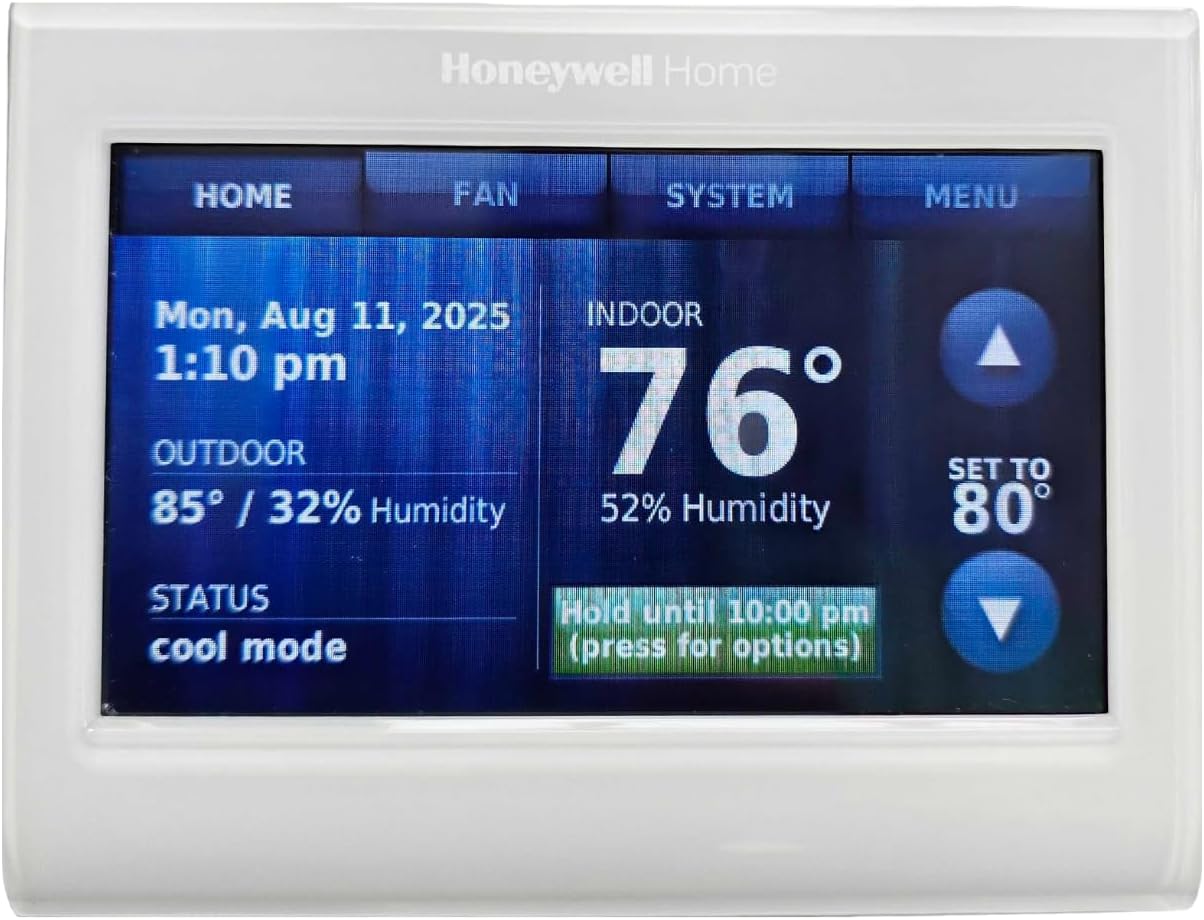
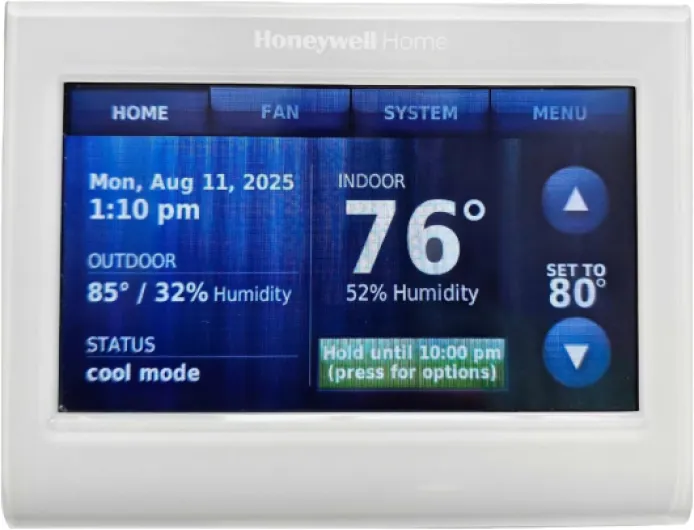
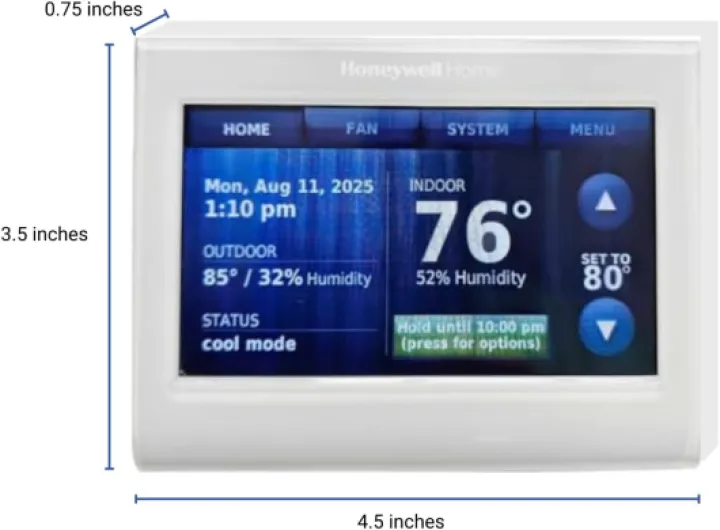
Design-wise, the TH9320WF5003 sits somewhere between “modern” and “a bit dated.” It’s a white, glossy plastic rectangle with a color LCD in the middle. The screen is about 3.75" wide by 2.13" high, which is big enough to read from a few feet away. It doesn’t have that sleek, round gadget look like a Nest, but it blends in fine on a standard wall. If you’re used to old beige thermostats, this will look like a serious upgrade.
The touch screen is resistive-style, not like a phone. You have to press, not just tap lightly. The menus are pretty packed, especially the installer/config menus, so the first time you go through them it feels a bit clunky. Once you set it up, you mostly just use the home screen and a couple of quick buttons, so it’s not a daily pain, but it’s not what I’d call “intuitive at first glance.”
One thing some people like is the changeable background color. You can pick colors to match your wall, or even team colors. Personally, I think it’s cosmetic fluff; I set a simple blue background to go with the white body and left it. But if you care about how it looks with your décor, at least you get some options instead of being stuck with one harsh color.
My main gripe is the screen behavior: it never fully turns off. It does dim after a while, but it still glows. In a hallway, that’s no big deal. In a bedroom or a light-sensitive area, it could be annoying at night. For a device that’s supposed to help save energy, it’s odd they didn’t include a “screen off until touch” option. Overall, though, the design is functional: everything is readable, the temperature is front and center, and you can see system status (heating, cooling, fan) at a glance. Not pretty, not ugly, just practical.
Power and C wire reality check
Even though the Amazon listing throws "batteries" into the spec section, in real life this thermostat is meant to be hardwired and depends on a proper 24V system with a C wire. That’s the first big thing to understand before you buy it. It draws continuous power for the Wi‑Fi radio and the backlit screen, so unlike older thermostats that could run off just two wires, this one needs that extra common wire to complete the circuit.
In my case, I had a spare blue wire in the thermostat cable that wasn’t being used. I went down to the furnace, found the control board, and connected that blue wire to the C terminal there, then hooked it up to the C terminal on the thermostat. Once that was done, it powered right up. Another reviewer had the same experience: older house, spare wire available, easy fix. If you don’t have a spare wire, things get more annoying. You either need to run new cable, use a Honeywell adapter/jumper kit, or rewire in a way that can cause weird behavior (like the fan running by itself if done wrong).
There’s mention of Lithium Ion batteries required, which is confusing. In practice, mine runs off the 24V supply and doesn’t need user-replaceable batteries. I haven’t had to deal with any battery compartment at all. So if you’re thinking “nice, no need for a C wire, it’s battery powered,” that’s not how this model works. Treat it as a hardwired-only thermostat.
Once it’s wired correctly, power has been reliable. During brief power outages, it keeps its settings and pulls the time from the internet once power and Wi‑Fi are back. I haven’t seen it lose its schedule or forget anything. So in terms of “battery” and power behavior: great once installed, but very picky about having that C wire. If your current thermostat only has two or three wires and no spare, budget time and/or money to solve that before you buy this one.
Everyday comfort: living with it, not just installing it
From a comfort point of view, the big win is predictable temperature. Once I dialed in my schedule, I stopped thinking about the thermostat. Mornings were at the right temp, evenings weren’t stuffy, and the system didn’t short cycle. Compared to my previous dumb programmable unit, this one hits the target times better because of that smart response/preheat logic. You feel the difference more on cold mornings or very hot days.
I also like having remote access for comfort tweaks. If I leave work early or come back from a trip, I can bump the temperature before I get home. It’s not life-changing, but it’s nice not having to come home to a too-cold or too-hot house because the schedule didn’t match my day. The app is basic but usable: a couple taps to change the setpoint, and that’s it.
A small comfort-related feature that I actually appreciate is the ability to run the fan after the compressor shuts off. One reviewer mentioned using this to dry out coils and ducts to avoid mildew. I use a similar setting at home: compressor off, fan keeps running a bit. That evens out the air temperature in the house and squeezes a bit more use out of the cooled or heated air still in the system. You don’t see it, but you feel more even temps room-to-room.
Where comfort could be better is the user interface. The menus are a bit overwhelming at first, especially if you dive into all the options. If you’re not into messing with settings, you might want to set it up once (or have someone tech-savvy do it) and then never touch the advanced stuff again. Also, as mentioned, the screen glow at night can be annoying in certain locations. So for comfort, I’d say it scores well on actual temperature comfort, decent on remote convenience, and just okay on interface comfort.
Built to last more than to impress
Durability-wise, this thermostat feels like a mature product that’s been around for years rather than a new gadget still working out the kinks. One reviewer has been running two units for about three years in an office environment (with 7 and 10 ton Carrier AC units) and reports they are still working perfectly, to the point that they bought a third one as a spare in case Honeywell changes the model. That says a lot about long-term reliability in a more demanding setting than a typical home.
The housing is just basic plastic, nothing fancy, but it doesn’t feel flimsy on the wall. The touch screen hasn’t shown weird dead spots or ghost touches in my use. Buttons and menus behave consistently. The firmware also seems stable: no random reboots, no bizarre lockups, and no need to “power cycle” it like some newer smart devices. It quietly does its thing.
Because it syncs time over the internet, it also recovers well from power outages. When power comes back, it reconnects to Wi‑Fi, pulls the correct time, and continues the schedule. That’s better than older programmable thermostats that would lose time and need to be re-set after every long outage. The only recurring glitch some people see is an occasional email complaining about the time being wrong, while the actual time on the unit is fine. That’s more of a server hiccup than a hardware durability issue.
As for physical wear, I don’t see anything that looks prone to breaking under normal use. It’s wall-mounted, you only tap it a few times a day at most, and there are no moving parts. As long as it’s not in direct sun all day or in a super dusty/mechanical area, I’d expect it to last many years. So it’s not premium in feel, but it seems solid enough to install and forget about for a long time.

Temperature control and Wi‑Fi: how it behaves day to day
In terms of temperature control, this Honeywell does its job well. Once I set my heating and cooling setpoints, it held the temperature in a tight band without noticeable overshoot. The "smart response" feature is actually useful: I told it to be at 73°F at 9 AM, and after a day or so, it started the HVAC early enough so the room was already at 73 right at 9. That lines up with what another user described running big 7–10 ton units in an office. The thermostat basically learns how fast your system heats/cools and adjusts start times.
The Wi‑Fi connection has been stable for me. It connects to the Honeywell/Resideo cloud, and from there the app or a web browser can control it. In a few months of use, I saw one or two brief disconnections where I got an email saying the thermostat lost contact, then it came back on its own. One Amazon reviewer mentioned getting occasional emails about the time being wrong, but every time they checked, the time was fine. That sounds like the thermostat just failing to sync with the time server once in a while. Not a big deal, just a minor annoyance in the logs.
Remote control is decent but not perfect. You can change temperatures, modes, and schedules through the app, and do manual on/off. Some deeper settings still require going to the wall unit (installer options, some advanced stuff). For my use, I rarely need those remotely, so it’s okay, but if you expect to change every possible parameter from your phone, this model doesn’t go that far.
One weird limitation: Daylight Savings mode is manual on some firmware versions. That means you might have to confirm the time change yourself instead of it just auto-adjusting like every other connected device in 2026. It’s not a huge problem, but it feels outdated. Overall, though, performance-wise, it’s solid: it keeps temperature where you want it, recovers on schedule, and the Wi‑Fi features actually work instead of being half-baked.
What this Honeywell actually offers in real life
On paper, the Honeywell TH9320WF5003 is a Wi‑Fi, color touch screen, programmable thermostat that runs on 24V and needs a C wire. In practice, that means it replaces a standard wall thermostat for most forced-air systems (heating, cooling, or both) and lets you control everything from the wall unit or the Honeywell/Resideo app. It’s sized like a typical modern thermostat: roughly 3.5 x 4.5 inches, not huge, but definitely visible.
The main features I actually use are: programmable schedules (weekday/weekend), remote control from the phone app, email alerts if the temp goes out of range or if Wi‑Fi drops, and the smart response that pre-heats or pre-cools to hit your target at the right time. There’s also a silly but kind of fun option to change the background color, including matching your sports team colors. I played with it once, set a neutral color, and never touched it again. Gimmicky, but harmless.
Compared to a Nest or Ecobee, this thing feels more like a classic thermostat that got Wi‑Fi bolted on, instead of a gadget trying to be clever. There’s no heavy "learning" of your habits or presence detection. It just follows whatever schedule you tell it. That’s either good or bad depending on what you want. Personally, I prefer telling it exactly what to do and not having it guess.
One detail worth noting: the Amazon listing can be confusing. It mentions batteries, but this thing is really meant to be hardwired with 24V and a C wire. If you expect to just slap it on two wires like an old mechanical thermostat, it’s not going to power up. Also, the box says “PRO install / 5-year warranty,” which makes you think you need a contractor. In reality, if you’re comfortable opening the furnace and matching terminals, it’s totally doable as DIY. Just don’t expect Honeywell to be very friendly if you call support and admit you installed it yourself.
Pros
- Stable temperature control with smart response that actually hits target times
- Reliable Wi‑Fi connection with useful app and email alerts
- Mature, proven model with many years of real-world use and good user ratings
Cons
- Requires a C wire, which many older homes don’t have without extra work
- Interface feels dated, screen never fully turns off, and some settings are clunky
Conclusion
Editor's rating
For me, the Honeywell TH9320WF5003 is a practical, slightly old-school smart thermostat that focuses on doing the basics well: accurate temperature control, solid scheduling, and reliable Wi‑Fi access. It’s not flashy, but once it’s installed and configured, you mostly forget about it, which is exactly what I want from something that runs my heating and cooling. The smart response feature that preheats or precools to hit your target time is genuinely useful, and multiple users have seen it work well both at home and in offices.
The big catch is the C wire requirement. If your existing setup has a C wire (or a spare conductor you can hook up), installation is straightforward for anyone comfortable with basic wiring. If you don’t, expect extra work or cost. The interface also feels a bit dated and busy, and the screen never fully turning off might bother some people. It’s also not packed with high-end smart-home tricks like occupancy sensors or deep integration with every ecosystem under the sun.
I’d recommend this thermostat to people who want a reliable Wi‑Fi thermostat with clear temperature control and decent remote access, especially if they already have or can easily add a C wire. It’s well-suited for homeowners, small offices, and rentals where you want predictable schedules and email alerts without overcomplicating things. If you’re in an older house with limited wiring, or if you want the latest smart-home features and tight integration with voice assistants and automation platforms, I’d look at newer models instead. It’s a solid, no-nonsense product, just not the most modern one on the shelf.