
Summary
Editor's rating
Is it worth the money compared to running new wire?
Simple design that feels more "contractor" than "consumer"
Packaging and instructions: basic, maybe too basic
Build quality and long-term reliability
How it actually performs once wired in
What you actually get in the box
Does it really save you from running new wires?
Pros
- Effectively adds an extra thermostat function (C-wire, W2, or cooling) without running new cable
- Very affordable compared to paying someone to pull new thermostat wiring
- Works with common smart thermostats (Nest, Ecobee, Sensi) on standard 24VAC systems when wired correctly
Cons
- Documentation is minimal and not very beginner-friendly; YouTube is almost mandatory for first-timers
- Easy to miswire if you don’t understand thermostat terminals, which can blow fuses or cause issues

Specifications
View full product page →| Brand | briidea |
When your smart thermostat meets your old wiring
I picked up the Briidea Add-A-Wire kit because my house has the classic problem: old thermostat cable with not enough conductors for modern smart thermostats. I didn’t feel like tearing into walls or paying a contractor a few hundred bucks just to run one extra wire. This little module is supposed to let one wire "act" like two on a 24V HVAC system, so you can add a common wire, a second stage of heat, or AC control without pulling new cable.
On paper, it’s simple: a small module at the furnace/air handler and a diode splice near the thermostat, plus a few wire nuts. In practice, it’s still low-voltage HVAC work, so you need to be comfortable opening your furnace panel and reading a wiring diagram. If that already sounds stressful, this probably isn’t for you unless you have a handy friend or a tech you trust.
I used it to solve a missing C-wire issue for a smart thermostat and also played around with it on a test board to see how it would behave with extra stages (like W2). The kit really is focused on one job: squeeze more function out of the wires you already have. It doesn’t do anything magical, but it does save you from fishing new cable in a lot of cases.
Overall, my first impression is that it’s a practical workaround more than a polished consumer product. The hardware is fine for the price, the instructions are basic, and the learning curve depends heavily on how comfortable you are with thermostat terminals and 24V circuits. If you know what W, Y, G, R, and C mean, you’ll probably be okay. If not, expect some homework or help.
Is it worth the money compared to running new wire?
From a value standpoint, this kit is hard to argue with if you’re in the typical situation: old 3–4 wire cable, new smart thermostat that wants a C-wire, and limited access to walls and ceilings. The cost of this kit is a small fraction of what an electrician or HVAC tech would charge to run a new thermostat cable, especially in multi-story homes or condos. Even if you pay a pro to install this module instead of pulling new wire, you’ll likely still come out ahead.
For DIYers who are comfortable around 24V systems, the value is even better. You spend a modest amount on the kit, maybe an hour or so studying diagrams and videos, and then an hour installing it carefully. In return, you get a stable smart thermostat setup, proper two-stage heating, or added cooling control without cutting drywall. That’s a pretty fair trade in my book. Compared to more well-known brands like Venstar, this Briidea version tends to be priced a bit lower while doing basically the same job.
On the downside, there is a hidden “cost” in terms of complexity and risk. If you wire it wrong and short R to C or misroute the signals, you can blow the low-voltage fuse on your furnace board and end up troubleshooting for an afternoon. That’s not the product’s fault exactly, but it’s part of the package when you choose this route instead of a clean new cable. Also, if your system is unusual or already borderline in terms of wiring, you might still need a pro to look at it, which adds to the total bill.
Overall, I’d rate the value as very good for standard 24VAC systems where you’re clearly just one conductor short. It’s not fancy, it’s not idiot-proof, but it can save you a chunk of money and hassle if you’re willing to put in a bit of effort or get a tech to install it instead of running new wires.

Simple design that feels more "contractor" than "consumer"
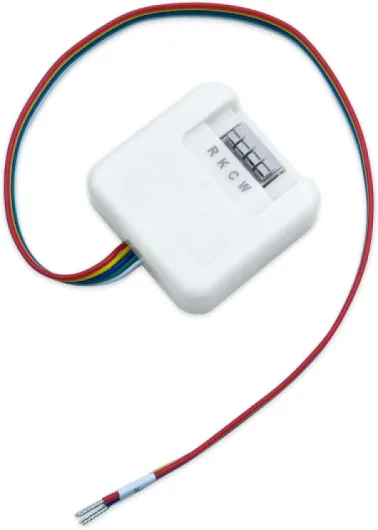
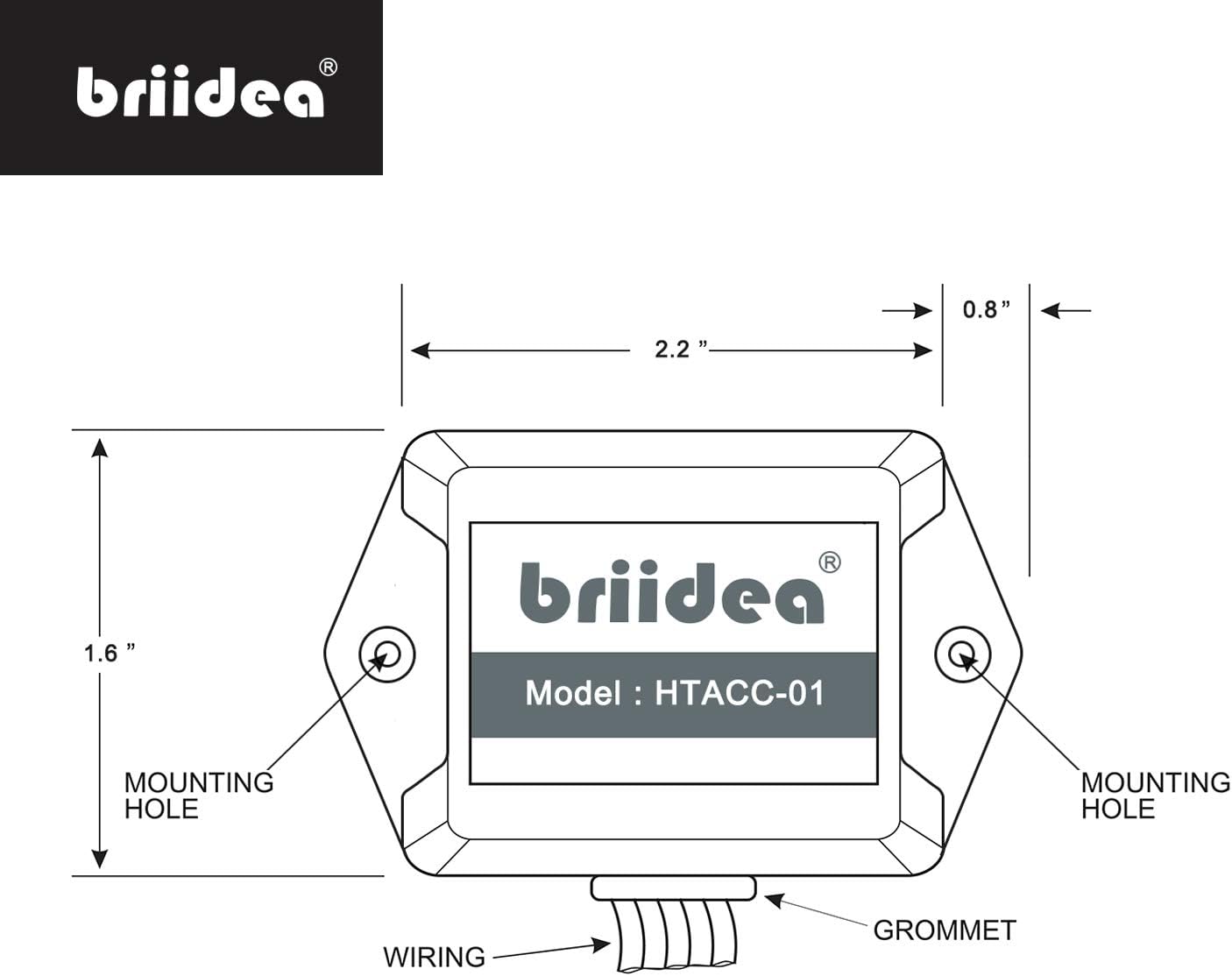
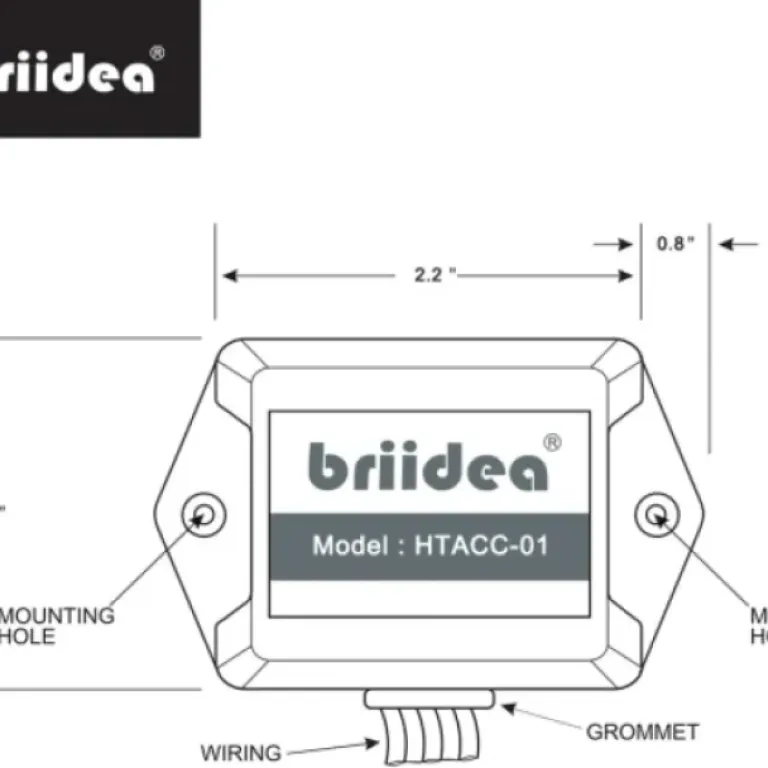
The design is very straightforward: a small rectangular module that mounts near your furnace control board, plus a diode "Y" that tucks behind your thermostat. There’s nothing fancy about it, and honestly that’s fine. It’s a low-voltage signal splitter, not something you stare at every day. The plastic housing is light and basic, but it doesn’t feel like it’s going to fall apart in your hands either. It’s the kind of thing you screw or tape inside the air handler and forget.
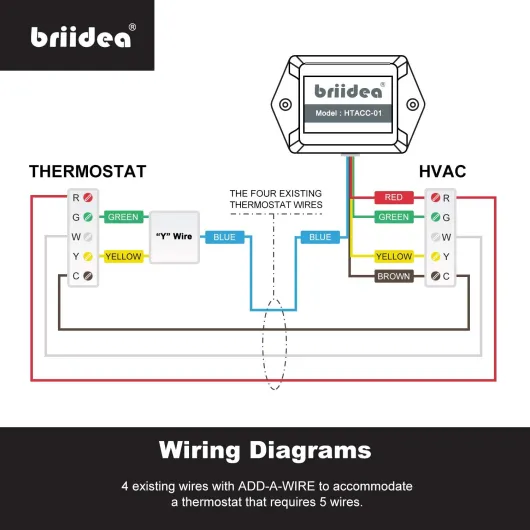
The main design idea is that the module lets one conductor carry two separate signals by using diodes and the way the thermostat calls for heating or cooling. That’s why the Y wire splice is directionally sensitive. The colors (yellow, green, blue) are there to help you match the diagram. The downside is that if you don’t respect the direction and terminals, it just won’t work right. This is one of those parts where design assumes the user knows what they’re doing.
Compared to more branded solutions like Venstar’s Add-A-Wire, this looks very similar in function. The terminals are clearly labeled, and the wire colors are standard enough that most HVAC folks will understand them right away. As a DIYer with some wiring experience, I had no trouble following the layout once I sat down and carefully matched each lead to the diagram and my control board.
In day-to-day use, you never see it. The only time design matters is during install: are the terminals accessible, are the wires long enough, and is it clear what goes where. On those points, it’s decent. Not polished like a consumer electronics product, but for a small HVAC module, it gets the job done. I’d call the design functional and no-nonsense, with the main weakness being that it’s not very beginner-oriented.
Packaging and instructions: basic, maybe too basic
The packaging is very simple: small box, the module, the Y-wire, a few wire nuts, and a one-page diagram. No padded inserts or fancy branding. For a low-voltage HVAC accessory that lives inside a wall or furnace, I don’t really care about premium packaging, but it’s worth mentioning that this feels more like something you’d buy from a parts wholesaler than a polished retail gadget.
The real weak spot is the documentation. You get a wiring diagram, but not much explanation. It doesn’t walk you through different use cases in plain language, like “here’s exactly what to do if you have heat-only and want to add AC” or “here’s the typical setup for adding a C-wire to a Nest.” That’s why several reviewers, including me, ended up watching YouTube videos (often for the Venstar equivalent) to confirm the steps. The diagram is fine if you already know what W, Y, G, R, and C terminals do, but if you’re new to this, it’s easy to get lost.
On the positive side, the diagram at least matches the wire colors and terminals on the actual unit, so you’re not guessing which screw corresponds to which function. The warning about not using the green and yellow wires of the Y assembly on R or C is there, but it’s a bit buried. I’d rather see a big bold box that says “Do NOT use this as R or C” to avoid people frying fuses or miswiring their systems.
Overall, packaging is no-frills but acceptable, and the instructions are just enough for someone with moderate DIY or HVAC experience. For a complete beginner, I’d say budget extra time to watch videos and maybe sketch your own diagram before touching anything. This is the main area where the product feels a bit cheap: they clearly assume the installer knows what they’re doing.
Build quality and long-term reliability
Durability on a part like this mostly comes down to two things: the quality of the electronics and how it handles being stuck inside a furnace cabinet for years. The module is very lightweight, but that’s normal for low-voltage control boards. There’s no heavy transformer or anything, just signal-level components. The plastic case feels a bit cheap, but once it’s mounted and the panel is back on, you won’t be touching it again unless you’re doing maintenance.
From my own use and reading through user feedback, there aren’t many reports of early failures. People mention using similar products for many years in the field. One HVAC contractor in the reviews said they’ve been using this type of solution for around 15 years in different brands, which tells me the concept itself is proven. Briidea isn’t a big name brand, but the electronics here are simple enough that if they’re not cutting corners too hard, it should last as long as the furnace’s control board itself.
The kit does include basic wire nuts, which are fine but nothing special. If you’re picky, you can always use your own preferred connectors. The little diode Y-wire is the one piece you need to treat gently during install, because if you yank on it too hard or bend it sharply, you could stress the solder joints or the diode. Once it’s tucked behind the thermostat, though, it just sits there and doesn’t move.
After install, I haven’t seen any intermittent issues that would suggest flaky connections or failing components. No random loss of calls, no weird fan behavior, nothing. For a part with no moving pieces and minimal heat load, I expect it to just sit there and work. I’d call the durability good enough for the job, especially considering the low cost and the 12-month warranty they mention.
How it actually performs once wired in
Performance-wise, the kit did what it claims, as long as you respect its limits. In my case, I used it to free up a common wire for a smart thermostat on a 4-wire setup. I reassigned one existing conductor as C, then used the Briidea module to share another conductor between two functions. After wiring everything and restoring power, the thermostat immediately detected the new C-wire, stopped complaining about low power, and has been running stable with no random reboots or battery drops.
The key measurable thing I noticed: before, the thermostat’s battery voltage hovered lower and it would occasionally reboot during long calls for heat. After the kit and a proper C-wire, the voltage stayed solid (other users reported similar numbers like 3.9V on Nest). On the furnace side, the calls for heating and cooling still triggered normally, and I didn’t get any weird fan behavior or short cycling that would suggest signal confusion from the shared wire.
I also tested a second setup on a bench to simulate adding a second stage (W2), similar to what one reviewer did with a Nest and a two-stage furnace. When wired correctly, the stats could trigger stage 1 and stage 2 separately, and the control board responded as expected. This lines up with the review where the user finally got proper two-stage behavior instead of time-based staging.
Where people seem to run into trouble is trying to use the kit itself as R or C, or ignoring the note about the diode directions. If you wire it wrong, you can blow a low-voltage fuse or just sit there wondering why nothing runs. In short, performance is solid if the install is correct. It doesn’t magically fix bad wiring practices, but as a workaround for missing conductors, it behaves reliably once set up.
What you actually get in the box
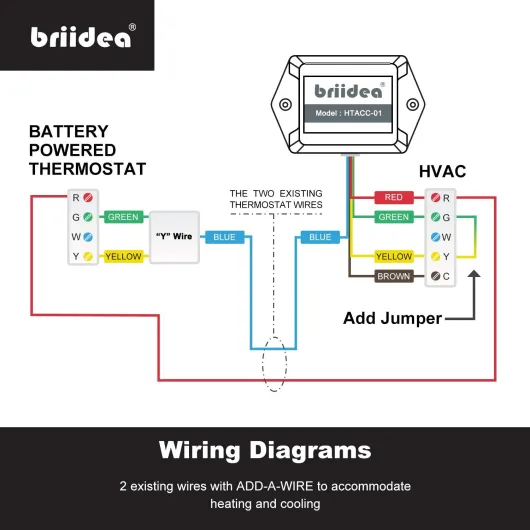
Out of the package, the Briidea kit is very barebones. You get the main Add-A-Wire module that sits by the furnace or air handler, a little Y-shaped wire/diode assembly with yellow, green, and blue leads, and a few wire nuts. That’s it. No fancy mounting hardware, no big manual, just a small wiring diagram sheet that assumes you already know the basics of thermostat wiring. This matches the Amazon reviews where people said the diagram alone isn’t super helpful for beginners.
The main factual thing here: this is designed more like a pro tool than a consumer gadget. The included paper shows which color goes to which terminal, but it’s not a step-by-step guide with photos. I ended up cross-checking with a Venstar Add-A-Wire video on YouTube, just like one of the reviewers mentioned. Once you see it done once, the Briidea layout makes sense because it’s basically a clone of that concept.
In terms of clarity, the product description is honest about some limits: it cannot be used as R or C directly, and it’s only for 24VAC systems. That’s important. Some people clearly tried to drive a C-wire through the module itself and ran into problems. You still need one existing wire to become your C, then the module helps you split another wire into two functions, like Y and G or W1 and W2.
So presentation-wise, expect a simple, almost no-frills kit. The parts are there, they match what’s advertised, but there’s no hand-holding. If you like tinkering and can follow a schematic, it’s enough. If you’re the type who needs a detailed booklet, you’ll probably be annoyed and end up on YouTube like I did.
Does it really save you from running new wires?
In practice, this thing is effective at its main job: avoiding the hassle of pulling new thermostat cable when you’re short one wire. For a lot of older homes with only 3 or 4 conductors behind the wall, that’s a big deal. Running new cable can easily cost a few hundred dollars, especially if the wire is stapled inside walls or runs through tight spaces. For the price of this kit, I was able to get a stable C-wire and keep my existing cable in the wall.
What I liked is that it’s flexible. You can use it to:
- Free up a C-wire for Wi-Fi thermostats (Nest, Ecobee, Sensi, etc.)
- Add cooling to a heat-only system if the hardware supports it
- Enable two-stage heating (W2) when you don’t have enough conductors
- Work around a broken conductor if one of your existing wires is dead
On the downside, it’s not magic. You still need enough total conductors to shuffle things around. For example, if you only have 2 wires, this won’t suddenly turn it into a fully featured multi-stage system. And if your system is not a standard 24VAC setup (like some proprietary or high-voltage systems), this is the wrong tool. Also, you cannot treat the module itself as a replacement for the R or C terminals, like the product notes clearly state.
So in terms of effectiveness, I’d say it’s pretty solid for typical 24V forced-air systems where you’re just one wire short. It’s not perfect, and there are edge cases where it won’t solve your problem, but for the common “I need a C-wire but only have 4 conductors” scenario, it works and saves real money versus running new cable.
Pros
- Effectively adds an extra thermostat function (C-wire, W2, or cooling) without running new cable
- Very affordable compared to paying someone to pull new thermostat wiring
- Works with common smart thermostats (Nest, Ecobee, Sensi) on standard 24VAC systems when wired correctly
Cons
- Documentation is minimal and not very beginner-friendly; YouTube is almost mandatory for first-timers
- Easy to miswire if you don’t understand thermostat terminals, which can blow fuses or cause issues
Conclusion
Editor's rating
The Briidea Add-A-Wire Common Wire Kit is a practical fix for a very common problem: not enough thermostat wires in an older house. It doesn’t try to be pretty or user-friendly in a big-box-store way; it’s basically a contractor-style tool sold cheaply to anyone who wants it. In my use, and based on what other buyers reported, it does what it promises: lets one conductor carry two functions so you can free up a C-wire, add a second heat stage, or get cooling control without ripping open walls.
It’s not perfect. The instructions are minimal, and if you’re not already familiar with thermostat terminals and 24VAC systems, you’ll be leaning on YouTube or a friend who knows what they’re doing. You also need to respect its limits: it’s for 24VAC only, it can’t be used directly as R or C, and it won’t magically turn a two-wire setup into a full-blown multi-stage system. But if you’re in that typical 3–4 wire situation and just need one more function, it’s a pretty solid workaround that can save you real money compared to running new cable.
I’d recommend this to: homeowners with basic electrical skills, DIYers who aren’t scared of furnace control boards, and pros who want a cheaper alternative to more branded add-a-wire modules. If you’re not comfortable opening your air handler or reading a schematic, or if your system is non-standard, you’re probably better off calling a tech and discussing whether this approach makes sense or if it’s time to bite the bullet and pull new wire.