
Summary
Editor's rating
Is it worth the money?
Design and noise: looks decent, sounds fine
Battery life and daily hassle factor
Build quality and long‑term confidence
Heating performance and app behaviour in real life
What this thing actually does (and doesn’t do)
Pros
- Easy to install on existing TRV valves with included adapters and clear in‑app guidance
- Solid room‑by‑room control with schedules, app control, and Alexa/Google voice support
- Low noise operation and practical features like frost protection and grouping
Cons
- Requires the separate Kasa KH100 hub and cannot control the boiler directly
- Kasa/Tapo ecosystem is confusing, with missing features like device sharing on the Tapo side
- Runs on AA batteries, which means ongoing replacement and hassle if you have many valves

Specifications
View full product page →| Brand | TP-Link |
Smart heating without overcomplicating your life
I’ve been using the TP-Link Kasa KE100 smart radiator valves for a while now, across a few rooms, and I’ll be honest: I went in mainly to cut my gas bill and stop heating rooms we barely use. I’m not a heating engineer, just a regular person who was annoyed at radiators blasting away in empty rooms. I already had some TP-Link stuff at home, so these looked like a logical next step.
The first thing to be clear about: this valve alone does nothing if you don’t have the Kasa Hub KH100. That’s where a lot of people get caught out. The valve is basically a smart motorised head that opens and closes the radiator. It does not control your boiler directly and it can’t replace your main thermostat. If your boiler is off, the valve can shout all it wants, nothing will heat up. So see it as a way to fine‑tune each room, not as a full heating system by itself.
In daily use, the KE100 sits somewhere between “boring but useful” and “actually pretty handy”. It doesn’t magically fix a badly balanced or badly insulated system, but it does let you stop wasting heat where you don’t need it. I’ve got one in the living room, one in a bedroom, and one in a little office, so I’ve been able to see how it behaves in different situations: doors closed, doors open, radiators behind furniture, etc.
Overall, my feeling is: it does the job it promises, but you really have to know what you’re buying and accept a few annoyances with the app ecosystem and the hub requirement. If you already own Kasa gear and like tinkering with schedules, it’s pretty solid. If you expect a fully integrated, super polished "whole house" heating solution that anyone in the family can control easily, you might find it a bit frustrating.
Is it worth the money?
In terms of price, the KE100 usually sits in the mid-range of smart TRVs. It’s cheaper than some of the big heating brands but not bargain‑bin cheap either. Considering what it offers – app control, voice control, scheduling, geofencing, sensor support – I’d say the value is pretty solid if you already own or plan to own the Kasa hub. If you have to buy the hub just for one or two valves, the overall bill climbs quickly and the value drops a bit.
Where it starts to make sense is when you have multiple radiators you want to control: living room, bedrooms, office, maybe a bathroom. Being able to drop the temperature in unused rooms and only heat where you are can easily save a noticeable chunk of gas or oil over a full winter, especially in a poorly insulated house. I can’t give you exact numbers because everyone’s home is different, but compared to running all radiators on manual valves at the same setting, it’s very likely you’ll use less energy with a good schedule and some discipline.
You do need to count the hidden costs though: batteries, possible external sensors, and your time to set everything up, tweak schedules, and occasionally troubleshoot app rules. If you enjoy this kind of tinkering, that time is almost fun. If you hate messing with apps and settings, the “value” starts to look worse because you’re paying for features you won’t really use.
Overall, I’d say: good value for money if you’re in the right profile – you already have TP-Link gear, you want to zone your heating properly, and you’re okay with a bit of setup work. If you just want something ultra simple your whole family can use without thinking, or if you’re starting from zero and need hub + multiple valves + sensors, I’d look closely at the total cost and maybe compare with other brands that offer a more unified, boiler‑integrated solution.
Design and noise: looks decent, sounds fine
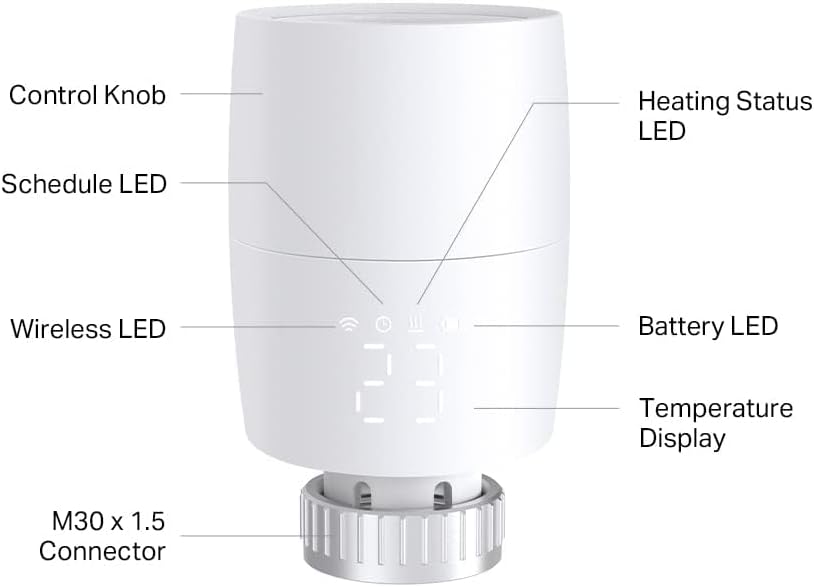
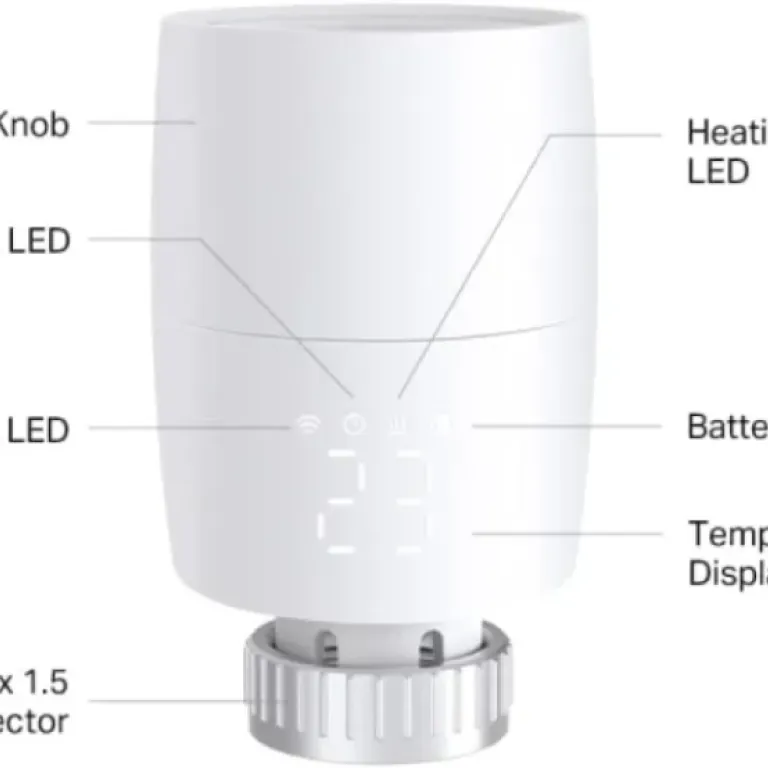
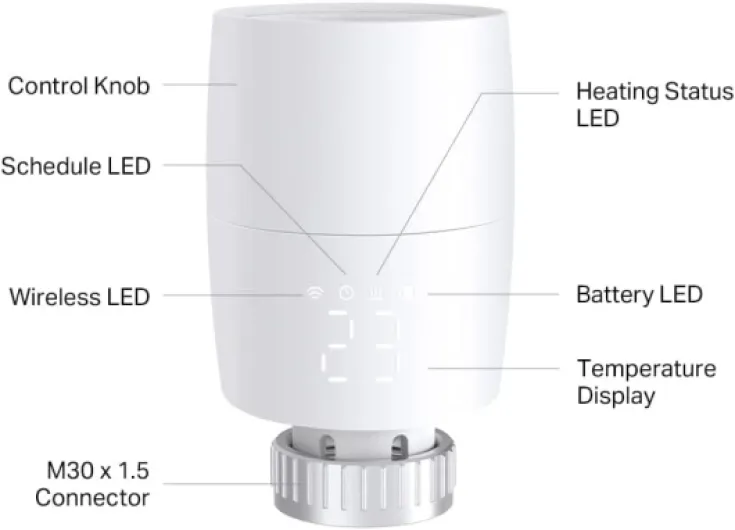
Design‑wise, the KE100 is pretty straightforward. It’s a white, round-ish plastic body with an LED display on the side and a rotating top ring you twist to change the temperature. It’s not particularly stylish, but it doesn’t look cheap either. On a white radiator it blends in fine, and it’s compact enough that it doesn’t bump into furniture unless your radiator is in a tight corner. The small display is simple: it shows set temperature and some icons, and you can read it easily if you mount it facing the room like you’re supposed to.
The box includes a bunch of adapters for different valve bodies (RA adapter, etc.), plus a small plastic tool you use to open the top cover, insert the batteries, and press the pairing button. It feels a bit fiddly the first time, but once you understand where to push and twist, it’s okay. My tip: do all the battery and pairing stuff before you screw it onto the radiator, especially if the radiator is in a tight or low spot. It saves you swearing on the floor with your head under the window ledge.
About noise: this is one of the things I paid attention to because I hate loud motors at night. When the KE100 adjusts, you hear a short low buzz for maybe one or two seconds as the motor moves the pin. Compared to older programmable TRVs I’ve used (some of which grind for 5–10 seconds), this is much quieter and much shorter. In a bedroom at night, I can hear it if I’m awake and the room is silent, but it hasn’t woken me up. There’s also a night mode that reduces how often it moves, which helps in sensitive rooms.
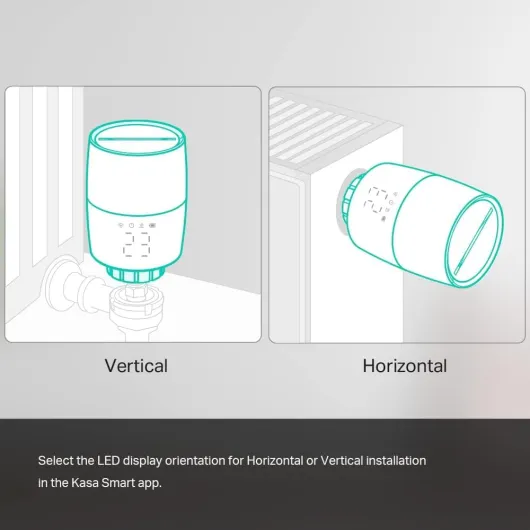
Overall, the design is practical rather than pretty. The plastic doesn’t feel premium, but it feels solid enough. Buttons and rotating ring react well, the display is readable, and the form factor works on most radiators as long as you mount it so the screen faces out. Just remember to line up the lock/unlock icons towards the room when tightening it, otherwise you end up with the display facing the wall – which is exactly the kind of thing you only notice after you’re done screwing it on.
Battery life and daily hassle factor
The KE100 runs on 2x AA batteries (included). That’s good because AA batteries are cheap and easy to find, and you’re not tied to some odd proprietary battery pack. The downside is that, obviously, you now have yet another device in the house that needs batteries. How big a deal that is depends on how many valves you install. One or two, no problem. Ten or twelve across the house, now you’re basically running a small battery logistics operation.
Battery life will depend on how often the valve has to move (so how unstable your room temperatures are) and the type of batteries you use. With decent alkaline batteries (I went for Panasonic and Duracell), most people seem to get many months out of them, at least a full heating season. I’m still in the first winter with mine, so I haven’t killed a set yet, but the app shows battery status and so far they’re holding up fine. One Amazon reviewer mentioned getting one dud set out of the box, so if something doesn’t power on, try swapping batteries before assuming the valve is broken.
A small annoyance: rechargeable NiMH AAs can be slightly thicker and not always fit perfectly in this kind of battery tray. One user said theirs didn’t fit well, and I had the same feeling with some older rechargeables I tried. They went in, but it felt tight and not super reassuring. I ended up using normal alkalines, which defeated my original “be greener” idea but at least everything closed properly and connected first time.
Day to day, you don’t think about the batteries much. The app gives you a low-battery warning, you pop the top cover with the supplied plastic tool, swap the batteries, and you’re done. It’s a 3–5 minute job per valve once you’ve done it once. Not a big drama, but again, if you have a lot of these scattered around awkward places (behind sofas, under windowsills), you’ll feel it more. For one or two valves, the battery side is basically a non‑issue. For a whole‑house setup, I’d factor in the hassle as part of the decision.
Build quality and long‑term confidence
From a build quality point of view, the KE100 feels solid enough for the price but not bulletproof. The outer shell is plastic, the mounting ring grips the valve body tightly, and the internal motor doesn’t sound strained when it moves. I’ve installed and removed one of mine a couple of times to move it between rooms and the threads still feel smooth, no cracking or wobbling. It’s not the kind of product you want to constantly move around, but occasional adjustments are fine.
Durability for this type of product is mostly about two things: the motor that pushes the pin and the electronics that keep a stable connection. So far, no issues: the valves calibrate correctly when installed, they don’t get stuck halfway, and they haven’t lost connection with the hub. One nice side effect of installing smart TRVs is that they actually revealed two old radiator pins in my house that were stuck open. Once I swapped out the old heads, it was obvious those valves were seized. So in that sense, they helped me diagnose some underlying plumbing problems too.
Where I have more doubts is not physical durability but software and ecosystem durability. TP-Link already caused some frustration by removing device sharing for these valves in the Tapo app, according to one of the reviews. That kind of move doesn’t break the hardware, but it does reduce the usefulness of a system you’ve paid for, and it makes you wonder what they might change in the future. If you’re planning to invest in a big setup (10+ valves, sensors, switches), this is something to keep in mind: you’re trusting TP-Link not to cripple features later via updates.
Overall, I’m reasonably confident these will last several winters from a hardware perspective. They don’t feel fragile, and TP-Link has been in the networking game for a long time, so it’s not some random no‑name brand. But I’d be lying if I said I had zero concerns about app changes and ecosystem choices over the next few years. If you want something that will just keep working the same way for a decade with no cloud dependency, you might prefer a fully local, non‑cloud, more old‑school system – but you lose the handy app and voice control in that case.
Heating performance and app behaviour in real life
In terms of pure performance, the KE100 does what a smart TRV is supposed to do: it opens when the room is below the target temperature and closes when it’s reached. The main catch is that it measures temperature right next to the radiator, which is usually warmer than the middle of the room. So if you set it to 20°C, your sofa area might actually be closer to 18–19°C depending on the room and airflow. That’s not really the valve’s fault; it’s just how these things work. You can fix that a bit by pairing an external Tapo temperature sensor, but that means buying more hardware and dealing with the Tapo side of the ecosystem.
Once the schedules are set, the behaviour is pretty predictable. My living room valve kicks in before we wake up, keeps the room comfortable most of the day, and then drops down in the evening when we move to the bedrooms. The bathroom one is set to heat just before shower time and before kids’ bedtime. This kind of room-by-room scheduling is where you actually start to see energy savings, especially if you used to heat the whole house evenly all day. You can also override the schedule easily from the app or by turning the ring on the valve itself, which is handy when plans change.
The app itself is mostly okay but not perfect. On Kasa, you can set schedules per device and group valves, which is useful if you have several radiators in the same room. There are also some slightly confusing bits like "Smart Control" vs "Smart Actions" that can overlap and make a radiator turn off just after you turned it on, if you’re not careful with the rules you’ve set. It’s not unmanageable, but you need to spend 10–15 minutes actually reading what each feature does instead of just tapping around randomly.
In terms of stability, mine have been reliable: they stay connected to the hub, react fast enough to commands (a few seconds at most), and I haven’t had random disconnections. Some people reported one dud set of batteries in the box; I didn’t, but it’s worth having a spare set at home. In short: performance is solid but not magic. It won’t fix bad insulation or a terrible central thermostat position, but it gives you decent control and consistency once you’ve learned its quirks.
What this thing actually does (and doesn’t do)
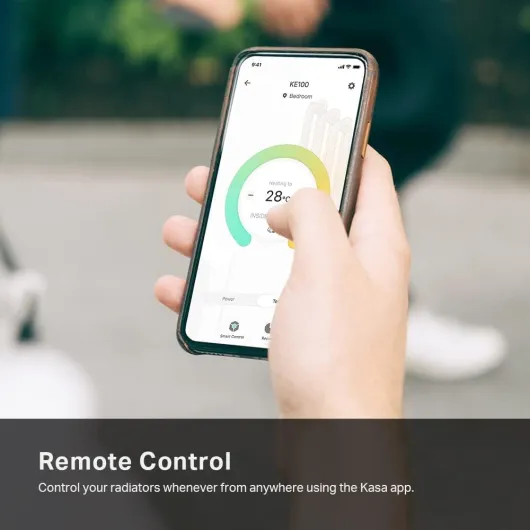
The KE100 is a smart thermostatic radiator valve head. That means it replaces the manual TRV head on your radiator – the little numbered knob – and turns it into a motorised, app‑controlled valve. It measures temperature near the radiator, opens or closes the pin, and follows schedules you set in the Kasa app. It connects wirelessly to the Kasa KH100 hub, and the hub is what talks to your Wi‑Fi and your Alexa/Google setup.
Important point: this cannot control your boiler directly. It’s not a Nest or Hive style controller. Your central thermostat or boiler programmer still decides when the boiler can fire. The KE100 just decides whether each radiator in each room should get hot water or not. In practice, that means you usually set your main thermostat a bit higher and let the valves do the room‑by‑room fine tuning. If your main thermostat is in the same room as a KE100, you have to be careful with the settings or they will fight each other.
Feature‑wise, it’s fairly loaded for a small plastic cylinder. You get: app control, voice control with Alexa/Google, energy‑saving schedules, frost protection, open‑window detection (when paired with a Tapo sensor), support for external temperature sensors (Tapo T310/T315), geofencing, and valve grouping. In reality, I mainly use schedules and quick manual overrides from the app. The fancy stuff like geofencing and external sensors is nice to have, but not essential unless you’re really trying to optimise every degree.
One thing that’s a bit messy is the Kasa vs Tapo situation. The valve itself is Kasa, but some advanced features rely on Tapo sensors and the Tapo hub. There are also user complaints about device sharing being removed on the Tapo side for these valves. So if your whole smart home is already on Tapo and you want everyone in the house to have full control, this mix of ecosystems is honestly a bit of a pain. If you stick to Kasa only, it’s simpler, but you lose some of the sensor tricks.
Pros
- Easy to install on existing TRV valves with included adapters and clear in‑app guidance
- Solid room‑by‑room control with schedules, app control, and Alexa/Google voice support
- Low noise operation and practical features like frost protection and grouping
Cons
- Requires the separate Kasa KH100 hub and cannot control the boiler directly
- Kasa/Tapo ecosystem is confusing, with missing features like device sharing on the Tapo side
- Runs on AA batteries, which means ongoing replacement and hassle if you have many valves
Conclusion
Editor's rating
Overall, the TP-Link Kasa KE100 is a practical, no‑nonsense smart TRV that does what most people actually need: room‑by‑room control, simple schedules, and the ability to kill heat in rooms you don’t use. It’s not flashy, but once set up it quietly gets the job done. Noise is low, the design is neutral, and the app control is handy, especially if you already use Kasa with Alexa or Google Home. In my case, I’m comfortable saying it’s helped me cut down on wasted heating without turning the whole house into an IT project.
That said, it’s not perfect. You must have the Kasa hub, it doesn’t control your boiler, and the Kasa/Tapo mix is a bit messy, especially with things like removed device sharing on the Tapo side. Battery swaps are manageable but not zero‑effort, and if you want really accurate temperature control in each room, you might end up buying extra sensors. So, who is it for? Good fit if you’re already in the TP-Link/Kasa ecosystem, want better control over individual rooms, and don’t mind spending some time fine‑tuning schedules. Who should skip it? People who want a single, integrated system that handles the boiler and all radiators in one place with minimal app fiddling, or anyone who gets annoyed by changing app features and cloud dependencies.