
Summary
Editor's rating
Is it worth the money compared to other smart thermostats?
Design and usability: clean look, simple interface
Build quality and long-term feel
Heating control and smart features in real life
What this thing actually is (and what it’s not)
Does it actually help with comfort and energy use?
Pros
- Designed specifically for wet underfloor and central heating with 3 A switching
- Built-in WiFi with no extra hub needed, plus decent app control
- Clear touchscreen with motion-activated display and flexible scheduling options
Cons
- Requires 230 V wired installation and 35 mm back box, often needing an electrician
- Alexa integration can be unreliable or confusing due to skill issues

Specifications
View full product page →| Brand | LavaTap |
A wired smart thermostat that doesn’t try to be flashy
I’ve been using the Heatmiser NeoStat WiFi (sold here under the LavaTap name) as the main thermostat for a wet underfloor heating loop and a standard boiler zone. I went for it because I wanted something I could control from my phone, that worked with HomeKit and didn’t need yet another hub cluttering up the router. On paper, this one ticks those boxes: built-in WiFi, app control, Alexa/Google/HomeKit support, and it’s designed specifically for wet underfloor systems.
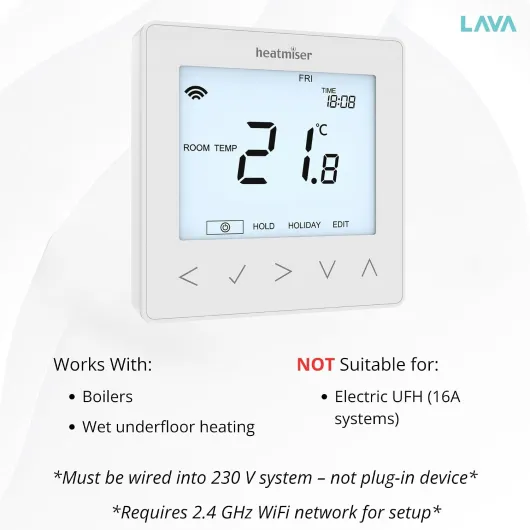
In day-to-day use, it feels much more like a traditional wired thermostat that happens to be smart, rather than a flashy gadget. It still needs a 230 V feed and a proper 35 mm back box in the wall, so this is not a quick plug-and-play upgrade. If you’re not comfortable with mains wiring, you’ll need an electrician, which adds to the overall cost. Once it’s in though, it behaves like a normal wall thermostat with some extra brains.
After a couple of weeks of tweaking schedules and living with it, I’d say it’s a pretty solid but no-frills smart thermostat. It doesn’t try to do fancy energy reports or loads of graphs like some others. Instead, it just lets you program times, change temps easily, and check or tweak things from your phone when you’re away. For my use, that’s basically what I wanted.
It’s not perfect though. The smart-home side is a bit uneven: HomeKit seems to work fine, but Alexa integration clearly frustrates some people, and I can see why if the skill doesn’t show up. Also, because it’s wired and 230 V, it’s not as flexible if you later want to move it or change layout. So overall, good thermostat if you know what you’re buying, but definitely not a magic solution for every heating setup.
Is it worth the money compared to other smart thermostats?
On value for money, this thermostat sits in an interesting spot. It’s usually cheaper than the big-name systems like Nest, Hive, or Tado when you factor in that those often need extra hubs or receivers, but it’s more expensive than a basic non-smart programmable thermostat. You’re basically paying a bit extra for WiFi control and voice assistant support, without all the bells and whistles of the premium ecosystem brands.
If you already have or need a wired 230 V thermostat for wet underfloor or a boiler zone, then this makes more sense. You’re not paying for wireless relays you don’t need, and you still get app control and scheduling. For that specific use case, I’d say the value is pretty solid. You get a clean-looking stat, decent app, and integration with HomeKit/Google/Alexa (assuming the skills behave) without filling your house with extra boxes.
Where the value drops a bit is if you’re starting from scratch and need a whole-house solution with multiple zones and wireless control. In that case, something like Tado with multiple room thermostats, or a full Heatmiser wired zoning system, might actually be a better long-term investment, even if the upfront cost is higher. This single NeoStat WiFi is more of a room-level or zone-level upgrade than a complete system by itself.
Also factor in installation cost. Because it’s 230 V, if you’re not comfortable with electrics, you’re likely paying an electrician for an hour or two, which pushes the total price up. If you compare that total (thermostat + install) to a simple battery-powered smart stat you can mount yourself, the gap gets smaller. Overall, for someone who already has wet underfloor, wants a neat wired thermostat with app control, and doesn’t care too much about advanced analytics, the value is good. For casual users who just want something simple and wireless, there are cheaper and easier options.
Design and usability: clean look, simple interface
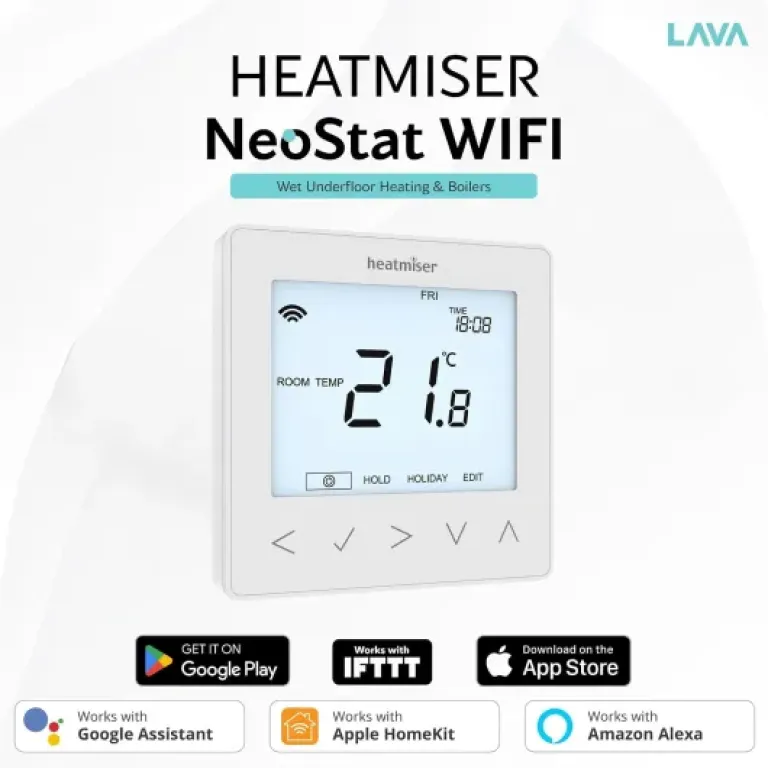
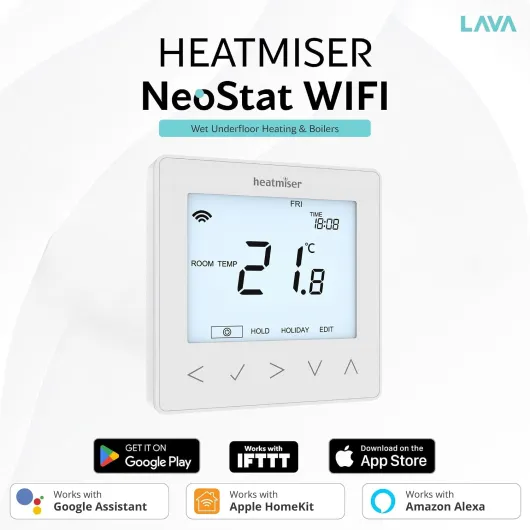
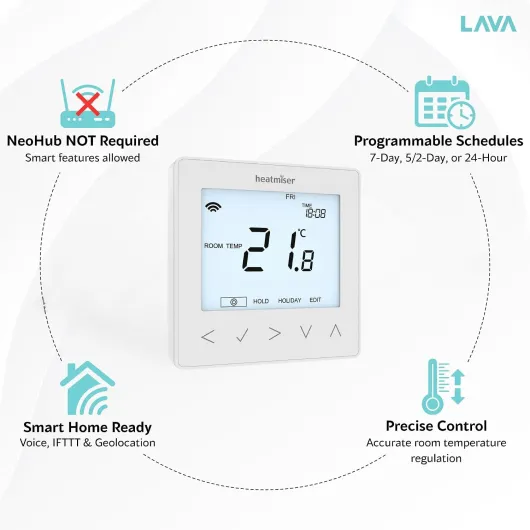
Design-wise, the NeoStat WiFi is clean and fairly minimal. It’s a square unit in glacier white plastic with a glass-like front and a touchscreen. It doesn’t scream “premium gadget”, but on the wall it looks modern enough and a lot better than the chunky beige thermostats you still see in older houses. The screen only lights up when you go near it, thanks to the motion sensor, which is actually handy in a hallway or bedroom so you’re not staring at a glowing panel all night.
The display itself is clear: big temperature numbers, basic icons, and touch areas that are easy enough to hit. It’s not some ultra-high-res screen but it does the job. The proximity sensor is one of the nicer touches: you walk past, it wakes up, you tap up or down, and you’re done. Compared to older Heatmiser-style controls with tiny buttons, this is a big step up in day-to-day use.
Navigation through the menus is okay once you’ve done it a couple of times. It’s not as intuitive as a phone app, obviously, but for setting schedules directly on the unit it’s manageable. You can switch between different programming modes (5/2, 7-day, 24-hour) and adjust setpoints without feeling like you’re fighting the interface. Still, I found myself preferring to do any serious schedule tweaking in the app, and just using the wall unit for quick temp changes.
One thing to keep in mind: it’s designed to be flush-mounted into a 35 mm back box. So if your wall box is shallow or you’re on solid brick and don’t want to chase out more depth, installation might be a bit of a faff. Also, despite the listing saying “ceiling mount” in the specs, in reality you’ll almost certainly wall-mount it at light-switch height. Overall, design and usability are pretty good: not flashy, not cheap-looking, just a decent, practical thermostat you won’t really notice after a week, which is kind of the point.
Build quality and long-term feel
In terms of materials and build, it’s mostly plastic with a glass-effect front, which is pretty standard at this price. It doesn’t feel ultra-premium in the hand, but once it’s screwed to the wall you’re not really handling it much anyway. The touchscreen responds reliably, and the housing doesn’t flex or creak. The buttons are all on the touch surface, so there’s no physical clicky parts that can wear out easily, which is probably good for long-term use.
The internal relay is rated for 3 A switching at 230 V, which is normal for controlling valves and boiler inputs. As long as you use it within those limits (i.e. not driving high-load electric underfloor directly), it should last. Heatmiser has been around for a while in the heating control world, and their wired stats are generally known for being fairly robust workhorses, not fancy gadgets that die in two years. There’s nothing in this one that makes me think it’ll be especially fragile, provided it’s wired correctly.
From a more practical angle, the fact it fits a standard 35 mm back box is a plus for long-term flexibility. If you ever want to swap it out for another brand later, you’re not stuck with some weird mounting system. The only slight worry is that because it relies on WiFi and an app, long-term support from the software side matters. If Heatmiser ever abandons the app or changes the cloud service, you could lose remote control. The good news is it will still function as a normal programmable thermostat on the wall even if the app disappeared tomorrow.
After some use, I haven’t seen any signs of overheating, random resets, or screen issues. It just quietly does its job. I wouldn’t call the build luxurious, but for something that sits on the wall and gets tapped a few times a day, it feels sturdy enough. If you want metal housings and fancy finishes, this isn’t it, but if you just want something that will likely keep working for years, it seems up to the task.
Heating control and smart features in real life
In terms of actual heating control, the NeoStat WiFi does what you expect a modern thermostat to do. Once wired up to a wet underfloor heating manifold and boiler, it switches reliably and holds the room around the set temperature without big swings. Underfloor heating is slow to respond anyway, so you’re never going to get instant changes, but the thermostat itself seems accurate and consistent. I didn’t notice any obvious overshooting or weird cycling.
The scheduling options are flexible enough for most people. You can pick 5/2 (weekdays/weekend), full 7-day programming, or a simple 24-hour schedule. Within that, you can set multiple time/temperature blocks per day. For example, I had it at 20°C in the morning, 18°C during the day, 21°C in the evening, and 17°C at night. Once set, it just follows that pattern without drama. For energy saving, that’s usually all you really need: not heating the floor when no one’s home or asleep.
On the app side, the neoApp works decently. It’s not the slickest app I’ve ever used, but you can see the current temperature, change the setpoint, and adjust schedules. The remote control part is genuinely handy: I used it to warm the house up on the way back from a weekend away, and it just worked. WiFi connection has been stable; no random dropouts so far. That said, the setup is a bit more old-school than some newer smart thermostats, and you do need to follow the instructions carefully when pairing it to your WiFi.
Smart-home integration is where it’s a bit hit and miss. One user clearly had trouble with Alexa because the “Heatmiser Neo Smart Home” skill couldn’t be found. I’ve seen that kind of thing before where skills or integrations change names or get region-limited. On the flip side, another user said it paired with Apple HomeKit with no issues, and that matches my experience: in HomeKit it shows up fine, responds to Siri, and can be included in scenes. So performance is solid on the core job (controlling heat), while the voice assistant side depends a bit on which ecosystem you use and how patient you are with the setup.
What this thing actually is (and what it’s not)
Let’s be clear: this NeoStat WiFi is a wired room thermostat with smart features, not a full-on whole-house heating system like Nest or Hive with wireless relays and extra sensors. It’s designed to sit in one room, wired directly to your wet underfloor heating manifold or boiler zone valve, switching up to 3 A. That means it’s fine for most wet underfloor or central heating circuits, but it’s not suitable for electric underfloor heating that needs 16 A switching. If you try to use it for that, you’re just asking for trouble.
Out of the box, you basically get the thermostat and a 35 mm electrical back box. No fancy extras, no wireless sensors, no separate receiver unit. The idea is that power and switching all happen in the back of the unit. So if your current thermostat is battery powered and only has low-voltage control wires, you’ll need extra work to bring 230 V there. If you’re replacing another 230 V thermostat with the same kind of switching, then it’s much more straightforward.
The smart features are focused on the basics: built-in WiFi to connect directly to your router, app control via the Heatmiser neoApp, and support for Alexa, Google Home, and Apple HomeKit. There’s no separate hub required, which is nice if you’re sick of buying extra little white boxes just to get app control. Once paired, you can create different schedules (5/2, 7-day, or 24-hour) and set multiple temperature periods per day.
So in practice, think of it as a modern replacement for a standard wired thermostat with scheduling, plus the option to tweak it from your phone or with voice control. If you’re expecting loads of advanced automation, weather compensation, or room-by-room zoning out of the box, you’ll be disappointed. If you just want a reliable wall thermostat with app support for a wet underfloor or boiler zone, the feature set is actually pretty sensible.
Does it actually help with comfort and energy use?
On comfort, I’d say the NeoStat WiFi does a good job. Once I’d dialled in the schedule for my routine, the rooms with underfloor heating felt more consistent, without that “too hot then too cold” cycle you sometimes get with basic thermostats. The proximity-activated display also makes it quick to check the current setpoint as you walk past, so you end up actually using the thermostat instead of ignoring it. For underfloor heating, which is slow and a bit unforgiving, having clear control and predictable behaviour matters more than fancy features.
On the energy side, it’s harder to put exact numbers on it, but the programming options definitely help. Before this, the heating was basically on a rough timer and a dumb stat, so the floor was often staying warm when nobody was in. With the NeoStat, I’ve set lower temps when we’re out and overnight, and you can see the boiler running less during those times. That’s not unique to this thermostat – any half-decent programmable stat will do similar – but at least here it’s straightforward to adjust and tweak as your schedule changes.
One thing I liked is how easy it is to temporarily override the schedule. If you’re home earlier or it’s colder than expected, you just bump the temperature up on the wall or in the app, and it holds that new setpoint until the next programmed change. No diving through menus or accidentally wiping your whole schedule. That makes it more likely you’ll actually use the scheduling properly instead of leaving everything permanent at 21°C out of laziness.
Where it falls a bit short compared to some pricier systems is on analytics and advanced optimisation. There’s no built-in learning, no smart pre-heat based on how fast your floor warms up, and no detailed consumption graphs. If you like data and want to squeeze every last bit of efficiency out, you might find it basic. But if your main goal is “set sensible times, avoid heating empty rooms, and tweak things from your phone”, this thermostat is effective enough and doesn’t get in your way.
Pros
- Designed specifically for wet underfloor and central heating with 3 A switching
- Built-in WiFi with no extra hub needed, plus decent app control
- Clear touchscreen with motion-activated display and flexible scheduling options
Cons
- Requires 230 V wired installation and 35 mm back box, often needing an electrician
- Alexa integration can be unreliable or confusing due to skill issues
Conclusion
Editor's rating
The Heatmiser NeoStat WiFi (LavaTap listing) is a no-nonsense wired smart thermostat that suits wet underfloor heating and standard boiler circuits pretty well. It doesn’t try to impress with fancy graphics or loads of data; it just gives you solid scheduling, a clear touchscreen, and app control over WiFi without needing an extra hub. Once installed, it keeps room temperatures steady, handles underfloor’s slow response sensibly, and the proximity-activated display is genuinely handy in daily use.
Where it scores is in being practical: standard 35 mm back box, 230 V wiring, 3 A switching, and straightforward programming modes. HomeKit integration works nicely, and the app is good enough for remote tweaks and basic management. On the downside, Alexa support seems hit and miss based on user feedback, the app and setup feel a bit dated compared to bigger brands, and the 230 V wiring means you probably want an electrician if you’re not confident with mains. It’s also not suitable for high-load electric underfloor heating, so you need to be sure your system is compatible.
In short, it’s a solid choice if you already have or want a wired thermostat for wet underfloor or a boiler zone and you care more about reliability than flashy features. If you’re after a full multi-zone smart heating system with deep analytics, or if you want something you can just stick on the wall without touching mains wiring, you should probably look elsewhere. But for a simple, wall-mounted smart stat that mostly just gets on with the job, it does the job well enough.