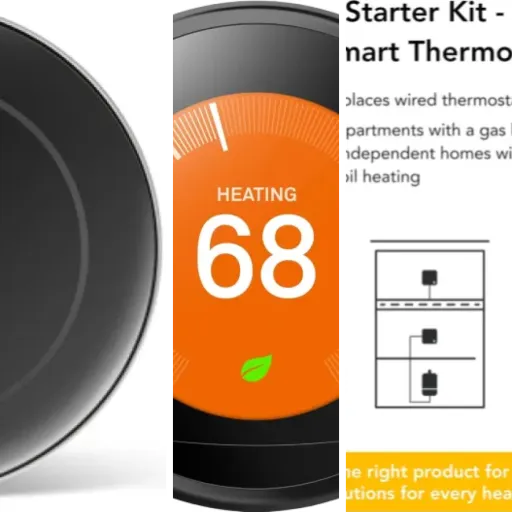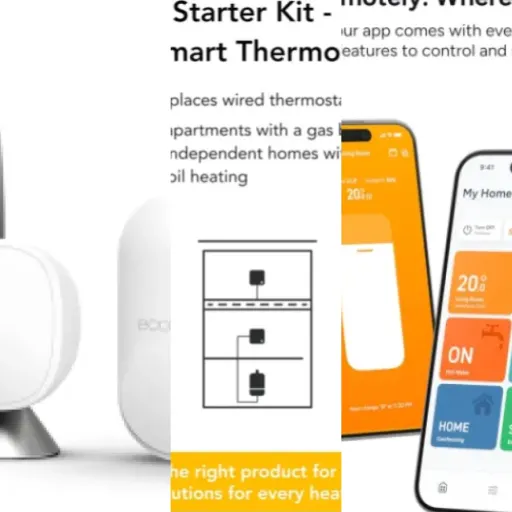

Summary
Editor's rating
Is it worth the money versus other smart thermostats?
Simple white box that doesn’t shout ‘tech gadget’
Battery life and power quirks
Build quality and how it holds up over time
How it actually heats the house day to day
What you actually get and how it fits into a real house
Pros
- Very good app and scheduling with precise temperature control
- Works with Alexa, Google Assistant, and Apple HomeKit without extra fees
- Clear installation guidance and decent battery life with early low‑battery warnings
Cons
- Some smart automation features locked behind a subscription
- On‑device controls are fiddly and not very friendly for non‑techy users

Specifications
View full product page →| Brand | tado |
Smart heating without the hype
I’ve been using the tado° Smart Thermostat Starter Kit V3+ for a while now, replacing a very basic wired thermostat on a combi boiler. I’m not an installer or anything, just reasonably handy and a bit of a tech nerd, so this is from that angle: regular home user who likes gadgets but also hates wasting time on stuff that doesn’t work. Overall, it does what it says: it lets you control your heating from your phone and with voice assistants, but there are a few catches you only really notice after living with it.
Out of the box, the first impression is that it’s a pretty solid, well thought‑out kit. You get the thermostat, the internet bridge, power supplies, cables, batteries, and even labels for the boiler wiring. So you’re not chasing extra bits from Screwfix mid‑install, which I appreciated. The app walks you through the setup step by step, and it’s clear they’ve put effort into the instructions. It’s less stressful than guessing with a generic thermostat manual.
Where it gets more interesting is day‑to‑day use. The big thing for me is being able to check and change the temperature from my phone when I’m out, or from the sofa when I can’t be bothered to get up. The scheduling is miles better than the clunky timer on most boilers, and it actually keeps time properly. You also get graphs of temperature and humidity, and a basic ‘energy savings’ view which is nice to look at, even if the numbers feel a bit optimistic at times.
It’s not perfect though. Some of the smarter bits that are heavily advertised, like automatic away mode and open‑window shutoff, are stuck behind a small subscription. You can still get notifications and do it manually, so it’s not a deal‑breaker, but it’s something you only really notice once you’ve set it all up. If you’re fine managing a couple of notifications yourself and just want solid app and voice control, it’s a good fit. If you expect fully automated magic out of the box, you might be a bit underwhelmed.
Is it worth the money versus other smart thermostats?
Price‑wise, the tado V3+ starter kit usually sits in the same ballpark as other big‑name smart thermostats like Nest, Hive, etc. You’re paying for a known brand, a decent app, and a system you can expand with radiator valves later. For what you get in the box (thermostat, bridge, accessories, decent software), I’d say the value is pretty solid, but it’s not some bargain miracle. It’s fair for what it does, especially if you plan to actually use the scheduling and remote control rather than just set one temperature and forget it.
Where the value gets a bit murky is the subscription side. The Auto Assist features (automatic away mode and automatic window detection response) are behind a monthly fee. It’s not a huge amount, but it’s still another subscription. The good news is that the core stuff – smart schedules, remote control, graphs, HomeKit/Alexa/Google integration – all work without paying extra. You still get notifications for open windows and when everyone leaves the house; you just have to tap to confirm. If you’re happy to do that, you can ignore the subscription completely and not lose much.
In terms of actual energy savings, don’t expect miracles. If you already have a modern efficient boiler and you’re not heating an empty house all day, the savings will be modest. Some people report 1–2% monthly, maybe more in specific months. The app’s “Energy Savings Report” likes to show off percentages, but when you look at your actual bill, it’s more about comfort and control than massive savings. The biggest “saving” for me is avoiding overheating the house by accident and being able to turn the heating down when I remember, even if I’m already out.
Compared to Nest, I’d say tado feels a bit more geeky and less polished in some areas, but more flexible in multi‑room setups and with slightly better granular control (0.1°C steps, proper room stats, etc.). If you just want something simple and pretty, Nest might feel nicer. If you want a system you can build out room by room and don’t mind a bit of setup and occasional tinkering, tado is decent value. Just go in with realistic expectations: you’re paying for convenience and control, not a magic cure for high gas prices.

Simple white box that doesn’t shout ‘tech gadget’
Design‑wise, the tado thermostat is basically a small white square (about 10.4 x 10.4 cm and very slim at 1.8 cm). It’s matte plastic, so it doesn’t reflect light all over the place, and it looks fairly neutral on the wall. If you’re used to the more flashy round Nest style, this is more low‑key. Personally, I prefer that – it just looks like a modern thermostat, not a shiny art piece trying to be the centre of attention in the hallway.
The display is an LED matrix hidden behind the white front. It only lights up when you press the touch button on the front, so most of the time it just looks like a blank square. When it’s on, you see the temperature and simple icons. It’s readable enough, but it’s not the brightest thing in the world, and if the thermostat is in a very bright spot you might need to look at it from straight on. There’s no fancy colour screen or anything, which is fine, but worth knowing if you expected something more flashy.
Controls on the unit are minimal: one main touch area for waking/changing and touch arrows for up/down temperature. It works, but it’s not very friendly for people who don’t like fiddly interfaces. You have to tap, wait for the target temperature to show, then adjust with the small touch arrows. It’s okay if you use it occasionally, but if you’ve got older relatives or someone who just wants a big dial to turn, they’ll probably hate it and stick to the app or shout at Alexa instead.
The internet bridge is a tiny white stick‑shaped box that sits near your router, powered by USB and connected by Ethernet. It’s small enough that you can hide it behind the router and forget about it. It does feel a bit old‑school to be using a wired bridge instead of pure Wi‑Fi, but in practice it’s stable and once it’s in, you don’t touch it again. Overall, the design is pretty sober: nothing flashy, but it blends in and doesn’t look cheap, which is what I want in something that lives on the wall for years.
Battery life and power quirks
The thermostat itself is battery powered (3x AAA batteries, included). In practice, battery life is decent. One user mentioned about 7 months (217 days) on the original Duracell set, which matches what I’ve seen: easily over half a year, depending on how often you poke it and how strong your signal is. For something you mount on the wall and then mostly leave alone, changing batteries once or twice a year is acceptable.
When the batteries start to run low, you don’t just get a sudden death. The system sends you an email and also shows a warning in the app. In my case, I got the warning a few weeks before the batteries actually needed changing, so there was no panic. That kind of small detail is nice because you’re not hunting for batteries at 10pm in winter while the heating refuses to kick in. Swapping them out is straightforward: pull the unit off the wall plate, change the batteries, clip it back on, done.
The internet bridge is powered via USB from the supplied adapter, and that stays plugged in all the time. Power consumption is tiny; it’s basically like having another small router or smart home hub. There’s no built‑in backup battery on the bridge, so if you lose power or unplug it, you lose remote control and app updates until it comes back. The heating itself will still work on the last known schedule, though, because the thermostat is the one talking to the boiler, not the cloud.
One odd thing in the spec sheet is the quoted “3600 kilowatt hours” wattage, which doesn’t really make sense for a thermostat in normal use. In reality, the device draws a tiny amount of power, so it’s not something to worry about. The main takeaway: you’ll be swapping AAA batteries every several months, not every few weeks, and you get plenty of warning. If you hate anything battery‑powered on the wall, this might annoy you, but compared to wireless thermostats that chew through batteries faster, tado is actually pretty reasonable.
Build quality and how it holds up over time
The thermostat housing is polycarbonate/ABS plastic with a matte finish. It doesn’t feel like a brick, but it doesn’t feel flimsy either. Once it’s screwed to the wall plate, there’s no wobble, and the front clips on securely. I haven’t had any cracking or weird noises when pressing the touch button. For something that just sits there and gets tapped occasionally, the build quality is more than enough. It’s not premium metal, but you’re also not paying designer‑object prices.
One thing people do mention is that the white surface picks up marks fairly quickly if you’ve got grubby fingers or a contractor installing it with dirty hands. Because of the matte texture, some marks don’t wipe off easily. Mine has a couple of faint smudges that are basically permanent now. It doesn’t affect performance at all, it just looks a bit more “used” than I’d like after a short time. If you’re picky about keeping things pristine, you might want to be the one to install it and wash your hands first.
Reliability over a couple of years seems decent based on user feedback. There are reports of whole systems (thermostat plus multiple radiator valves) running for two years straight with no hardware failures, just the occasional temporary connection warning. The weak spot in the tado ecosystem seems to be some of the radiator valve adapters, especially the Danfoss RA ones, which can be a bit rubbish and need replacing. That’s not directly the thermostat’s fault, but if you plan to expand the system later, it’s something to keep in mind.
The 2‑year manufacturer warranty is standard, not generous, but combined with the fairly solid track record, I’m not too worried about sudden failure. It feels like the kind of device that will quietly live on the wall for years. Just accept that it might not look brand‑new forever unless you’re careful with it, and that any expansion to radiator valves might involve a bit of extra fiddling or buying better adapters if your existing valves are awkward.
How it actually heats the house day to day
This is the bit that really matters: does it actually control the heating better than a dumb thermostat? In my case, yes. The temperature control is more precise, and the house doesn’t swing between too cold and too hot like it did with the old clicky mechanical stat. You can set temperatures in small increments (0.1°C steps), and the thermostat modulates the boiler (if your boiler supports it) instead of just doing brutal on/off all the time. That means less overshoot and a more stable room temperature.
The schedules are the main improvement over a basic boiler timer. You can set different temperatures throughout the day, and even have different programs for weekdays and weekends. For example, I’ve got: early‑morning warm‑up, daytime lower temp, evening comfort, and night‑time setback. You can add as many blocks as you want, so you’re not fighting a rigid 4‑slot programmer like on older boilers. Once it’s dialled in, you mostly forget about it and just tweak occasionally when the weather changes.
Features like weather adaptation and geofencing are nice extras, but I’d call them bonuses, not core. Weather adaptation basically means it tries to account for outside temperature so it doesn’t blast heat unnecessarily on milder days. It’s not magic, but it stops some of the more ridiculous runs when the sun is doing half the job. Geofencing works, but the full automation (auto away/auto home) is locked behind the Auto Assist subscription. Without paying, you still get a push notification like “Nobody is home, set to Away?”, and tapping that does the job. So you don’t need the subscription, you just lose a bit of convenience.
In terms of stability, it’s been solid for me. The thermostat reconnects to Wi‑Fi via the bridge reliably, even after router reboots. Some users mention occasional “device not connected” errors that turn out to be tado’s remote servers having a wobble, but it usually sorts itself without you doing anything. Locally, the heating still follows the last schedule even if the internet connection dies, so you’re not left freezing because your Wi‑Fi dropped. Overall, performance is pretty strong: not flawless, but clearly better than a basic thermostat setup.
What you actually get and how it fits into a real house
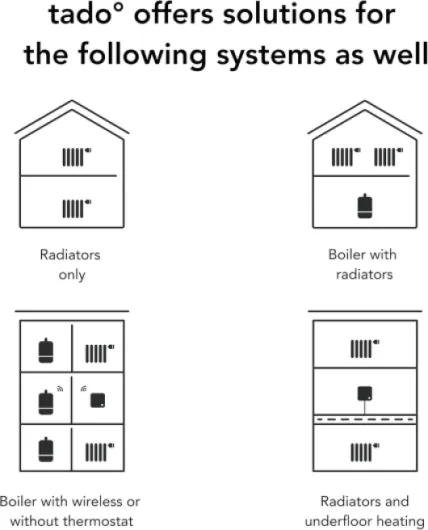
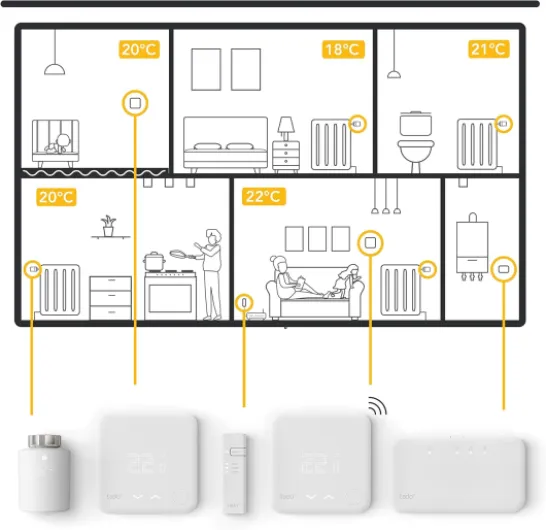
The Starter Kit V3+ is basically the brain of the tado system. In the box you get: the square wall thermostat, the little internet bridge that plugs into your router, a USB cable and Ethernet cable, UK and EU power supplies, some sticky pads, wall plugs and screws, plus three AAA batteries already included. No need to buy extra batteries on day one, which is handy. It’s clearly meant to replace an existing wired thermostat – if you don’t have one, or if your setup is more complex, you might end up reading help pages a bit more carefully.
Installation is surprisingly structured. You create an account, scan the codes on the thermostat and bridge, and the app or web setup guides you through questions about your boiler and current thermostat. tado has a long list of boiler and thermostat models in their database, so in many cases it just tells you exactly which wire goes where. For basic combi boiler + wired stat setups, it’s pretty straightforward. I’m not an electrician but I was comfortable doing it after turning off power at the fused spur and double‑checking the diagram.
Once it’s wired and the bridge is online, the thermostat shows a simple LED display and you can start playing with it. The app is where the real control lives: you get rooms, schedules, manual overrides, and settings like how long manual changes stay active. It’s not something I’d hand to my parents with no explanation, but anyone who’s used any smart home app before will figure it out fairly quickly. The learning curve is more in understanding all the options (geofencing, open‑window detection, etc.) than basic temperature control.
What’s worth knowing is that this kit is just the start. Out of the box, you get smart control of a single heating zone (your whole house, basically). To do proper multi‑room control, you need to add their smart radiator valves or more thermostats, and that’s where the cost creeps up. It’s fine as a starting point, but if you’re already thinking of doing every radiator in the house, you should factor in that it becomes a fairly expensive system once you’re done.
Pros
- Very good app and scheduling with precise temperature control
- Works with Alexa, Google Assistant, and Apple HomeKit without extra fees
- Clear installation guidance and decent battery life with early low‑battery warnings
Cons
- Some smart automation features locked behind a subscription
- On‑device controls are fiddly and not very friendly for non‑techy users
Conclusion
Editor's rating
Overall, the tado° Smart Thermostat Starter Kit V3+ is a solid upgrade from a basic wired thermostat. The big wins are the app control, proper scheduling, and more stable temperatures. It looks clean on the wall, the installation guidance is clear if you’re even slightly handy, and it plays nicely with Alexa, Google Assistant, and Apple HomeKit. Battery life is decent, and once everything is set up, it mostly just does its job in the background. You don’t need the subscription for the core features, which is important – the free notifications for away mode and open windows cover most use cases for normal users.
It’s not flawless though. The on‑device controls are a bit fiddly and not ideal for non‑techy or older people. Some of the more heavily advertised “smart” bits are locked behind a small monthly fee, which feels slightly annoying even if you can skip it. If you expand to radiator valves, be ready for some adapter quirks and extra cost. And the energy savings are real but not dramatic; think better comfort and a bit more control rather than massive bill cuts.
If you want a practical, app‑driven thermostat that you can later expand into a room‑by‑room system, tado makes sense. If you’re after the slickest, most idiot‑proof single thermostat and don’t care about multi‑room, something like Nest might feel a bit more straightforward. For me, tado hits a good middle ground: not perfect, not cheap, but a pretty solid everyday upgrade that genuinely improves how I manage heating at home.